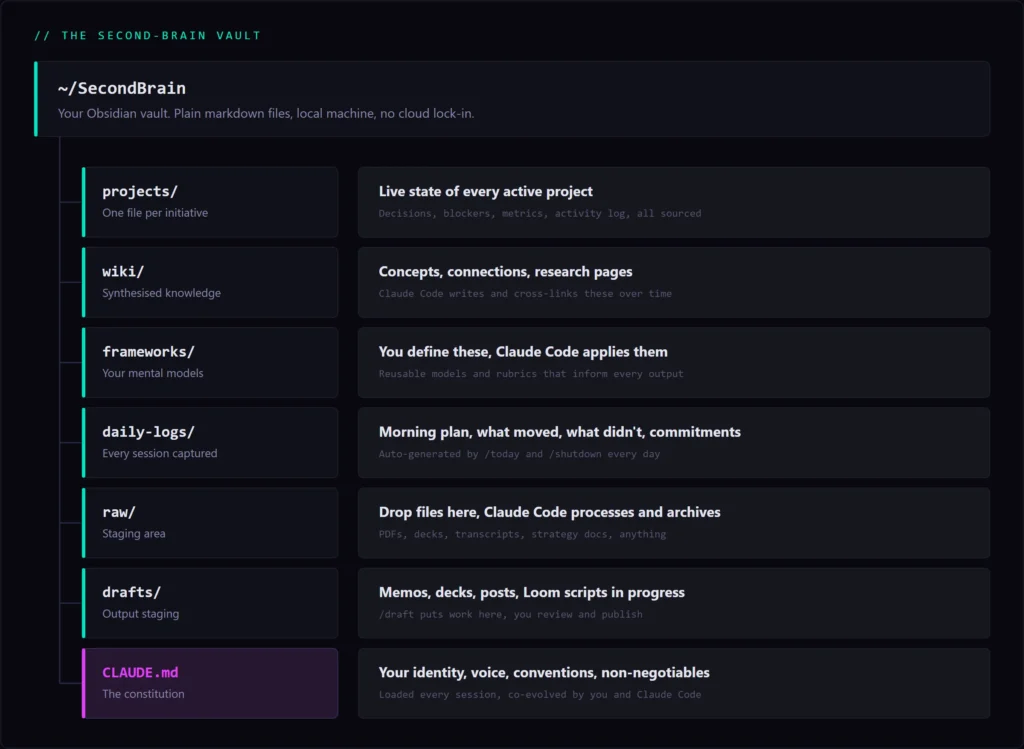
Running SEO campaigns across multiple clients is a context management problem as much as it is a skills problem. Every client has its own keyword universe, its own technical debt, its own content gaps, its own competitive landscape. Every week brings fresh GSC data, new ranking shifts, competitor moves, and a backlog of decisions that need to be made with imperfect information.
For a long time, I managed this the way most consultants do: a mix of project management tools, saved Ahrefs reports, half-finished notes, and an uncomfortable amount kept in my head. It worked, mostly. But “worked mostly” is a fragile system.
Three months ago, I built something different: an AI Second Brain, a structured knowledge system that holds the full context of every client engagement, reads and updates automatically, and gives me a genuine strategic partner every time I open a session. It’s the single most impactful thing I’ve done to improve the quality and speed of my work.
This is the complete system. How it’s built, how it runs, and why it changed how I work.
Key Takeaways
- An AI Second Brain pairs an Obsidian vault (structured client context) with Claude Code (an AI that reads and writes to it with full memory across sessions).
- The vault holds everything that determines a campaign: keyword data, audit findings, decisions, and strategies, stored as plain files you own.
- Five layers make it work: a seeded Foundation, a Daily/Weekly Loop that compounds, a Strategy Layer for cross-client reasoning, a Creation Engine for context-loaded output, and a Governance Layer that keeps it honest.
- Memory persists through hooks that load full context at session start and save a structured summary at session end, so nothing is lost between sessions.
- The result: less time remembering, more time deciding.
What You’re Building
The system runs on two things working together: an Obsidian vault and Claude Code.
Obsidian is a tool for working with plain markdown files, text files that live on your machine, not in someone else’s cloud. You can open them, search them, link them together, and browse them as a connected knowledge graph. For SEO work, this matters: your keyword research, your audit findings, your content strategies, your client decisions all live in files you own and control, not locked inside a SaaS tool’s database.
Claude Code is an AI that runs in your terminal and reads and writes directly to that vault. What makes it different from a standard chat interface is persistence. Every time you start a session, it automatically loads your CLAUDE.md file (your operating rules, your client roster, your conventions) and your project index. It has your full context before you say a word.
CLAUDE.md is the constitution of the whole system. It holds your working style, your SEO frameworks, your client non-negotiables, and your conventions for how things get named and structured. It’s the file that makes every session feel continuous rather than starting from scratch. You evolve it with Claude Code over time, and it gets sharper the more you use it.
The vault is the structured knowledge. Claude Code is the intelligence that reads it, writes to it, and reasons across it. Neither works without the other. A vault without AI is a wiki that decays because no one has time to maintain it. AI without a vault starts from zero every session and forgets everything the moment you close the tab.
And you own it entirely. The vault is files on your machine. You can browse it in Obsidian, search it with any text tool, and back it up however you want.
How Memory Actually Persists
This is the question every SEO who tries AI tools runs into: doesn’t it forget everything when you close the session?
It would, without the hooks.
Three automated processes run in the background to make memory permanent. When you start a session, a hook fires that loads your CLAUDE.md and project index before you say a word, giving you full client context instantly. When Claude Code is running low on context mid-session, a pre-compact hook intercepts, extracts a structured summary, and saves it to your daily logs before anything is lost. When you close a session, the same process runs: decisions made, keyword findings noted, action items captured, all written back to the vault.
Key insight
Every session leaves a trace. Every trace is available to the next session. That’s the architecture that makes everything else work.
1. The Foundation: Seed It With What You Already Have
The starting point is simpler than it sounds. You gather the documents you already have on a client (existing keyword research, technical audit reports, GSC exports, content inventories, competitor analyses, past strategy docs), drop them into a folder called raw, and run one command.
/project new <client-name>The system reads every file in that folder, extracts the structure (target keywords, ranking positions, identified issues, content gaps, decisions made, open questions), and produces a single living project file with every claim sourced back to the document it came from.
For a new client I onboarded recently, I dropped in 30 documents: a previous agency’s audit, six months of GSC exports, an Ahrefs site crawl, competitor content breakdowns, and the initial strategy brief. The system produced a structured project file with priority technical issues ranked by estimated impact, a keyword gap summary tied back to specific SERP data, content opportunities mapped by cluster, and open decisions awaiting data. What would have taken me a full day of synthesis came together in minutes, and every claim was sourced.
Those were all documents the client had already produced. To get a website itself into that folder, theirs or a competitor’s, I run a crawl instead: Screaming Frog’s Custom JavaScript can convert an entire site to markdown in one pass, and the files drop straight into raw. Check the extraction hit rate before you trust it, though, because the script most people use silently drops a quarter of the pages.
Living Documents: A Live Intelligence Feed for Every Client
Every client engagement runs on a small set of canonical sources that determine whether it’s on track or in trouble: the GSC performance dashboard, the rank tracker, the monthly reporting pack, the content calendar, and the decisions and blockers log.
After seeding, you tell the system exactly which sources matter for each client and how often they change. GSC data refreshes weekly. Rank tracking updates daily. The monthly report drops on a fixed cadence. The system maps the cadence, checks each source on schedule, and pulls in changes when they’ve been modified.
What this gives you is something most consultants never actually have: every client file stays current automatically. When you ask a strategic question (where are we against traffic targets, what’s blocked, what changed since last week), the answer is drawn from sources checked this morning, not a snapshot you took three weeks ago.
2. The Daily and Weekly Loop: The Rhythm That Builds on Itself
This is what separates the Second Brain from every project management tool or note-taking app you’ve tried. Those start strong and decay because someone has to maintain them. This works the opposite way: you use it to do your work, and the vault gets smarter as a side effect.
The loop has four moments: morning, before client calls, during the day, and end of day.
Morning: /today
You open the system and run one command. It scans your sources simultaneously: your calendar (classifying open blocks by depth, 90+ minutes for deep work, under 45 for shallow tasks), your client project files (extracting open decisions and items waiting on you), yesterday’s plan (unfinished items get a ranking boost), your recent daily logs (open commitments not yet resolved), Gmail (client threads that need a response), Asana (tasks with due dates, overdue items boosted), and any priorities you flagged manually.
Then it ranks everything into priority tiers: a client blocked waiting on me, a deliverable deadline, a project milestone at risk, a personal commitment. Items rolling forward from previous days get boosted within their tier.
Then it schedules. Deep blocks get strategy and writing work. Medium blocks get reviews, audits, and analysis. Shallow blocks get email responses and quick approvals. If there isn’t enough time for everything, it says so and tells you what to cut or defer.
Before client calls: /brief [client or project]
Run this before any meaningful client meeting. It pulls from your project files, recent email threads, Ahrefs data, and GSC performance simultaneously. What you get is a structured brief: where rankings and traffic currently stand vs. targets, what’s changed since the last call, your last stated position on the key strategic questions, open items that haven’t been resolved, and what the client is likely to ask about. Every claim cites its source.
During the day: /priorities add
Something lands mid-call that changes your week. A client moves a deadline. A ranking drop needs investigation before the next report. You don’t re-run /today. You run /priorities add [thing] and the system holds it. It shows up in tonight’s shutdown and feeds into tomorrow’s /today automatically.
End of day: /shutdown
Three questions: what got done, what didn’t, any new commitments? The system pulls up today’s plan, reconciles it against what you’ve told it, marks items done or deferred, extracts new commitments and routes them to the relevant client files, and saves the full session summary to daily-logs/. Five minutes. This is what makes the system compound. Every /shutdown adds to what /today knows tomorrow.
The weekly feed: /ingest
The daily loop keeps you organised. /ingest keeps the vault fed. Your SEO intelligence doesn’t arrive in one place; it comes through client emails, GSC alerts, Ahrefs rank changes, meeting notes, and shared documents. /ingest pulls from all of them at once and routes everything into the right place in the vault.
Full scan mode checks all your sources simultaneously and shows you a routing table before anything gets written: here’s what changed, here’s which client it belongs to, here’s what to do with it. Quick mode (/ingest raw) skips the external scan and processes only files you’ve manually dropped into raw/, useful when a client sends a PDF or a competitor analysis lands in your inbox. Both modes require your confirmation before touching the vault.
3. The Strategy Layer: Questions You Couldn’t Answer Before
Once the Foundation is seeded and the Daily/Weekly Loop is running, you have something most SEO consultants don’t: a complete, current, connected view of every engagement you’re running.
Connecting dots across clients and data
“Three clients are seeing the same pattern, strong impressions growth but declining clicks. Is this an AI Overview issue, a title tag issue, or something else across all three?”
“My two B2B SaaS clients both have thin top-of-funnel content. If I’m prioritising one for a content push this quarter, which has the better keyword opportunity gap?”
Stress-testing your own strategy
“We set a traffic growth target of 40% for Q3. Walk me through which keyword clusters are expected to deliver that and where the gaps are.”
“This client has four open technical issues. If I can only get engineering to fix two before the next reporting period, which two move the needle most on crawlability?”
Tracking commitments and deliverables
“That content audit deliverable has been slipping. When did it first appear in my plan, how many times has it rolled forward, and what’s it blocking?”
The shift this creates is hard to describe until you’ve felt it. You stop operating at the edge of your context, that low-level anxiety of knowing you’re probably forgetting something about a client. The system holds the complexity. Your job becomes making the decisions, not remembering the inputs.
4. The Creation Engine: Output With Full Context Loaded
The system doesn’t just organise information and answer questions. It produces the artifacts you’d otherwise spend hours writing, grounded in everything the vault knows.
The difference between asking a standard AI to write a client strategy memo and asking this system is context. A standard AI starts from zero. This system starts from the client’s project file, keyword data, ranking history, open decisions, and your previous recommendations. The draft it produces isn’t generic; it reflects the actual state of the engagement, sourced and current.
/draft, every output format you need
You tell the system what you need and the topic. It searches the vault for everything relevant and produces a first draft with source citations. Four formats, each with tight rules:
| Format | Rules |
|---|---|
| Memo | Recommendation first, always. TL;DR, context, argument, risks, ask. Never longer than two pages. |
| Deck | Slide-by-slide outline with speaker notes. One key point per slide, twelve slides maximum. Opens with the sharpest version of the argument. |
| The point in the first sentence. Context below it. Under 200 words. If it needs to be longer, it should be a memo. | |
| Report | Executive summary first, data and findings below it, recommendations with prioritisation, next steps. |
Every draft saves to the vault with the sources it drew from. The first draft is 80% there because the context was already loaded.
5. The Governance Layer: The System That Keeps Itself Honest
Any knowledge system drifts. Rankings go stale. Decisions get recorded inconsistently. Things fall through the cracks. The difference here is that the system catches its own drift, so you don’t have to.
/lint, the vault health check
Run this once a week. It reads every file in the vault and checks for six specific problems:
- Contradictions: a keyword cited with different search volumes in two files, or a recommendation recorded as open in one place and closed in another. The system finds them before your client does.
- Stale claims: any number, ranking position, or status older than 60 days without a refresh.
- Orphan pages: files that exist but nothing links to them. Connect them or remove them.
- Missing concepts: terms or topics that appear in three or more files but don’t have their own dedicated page.
- Neglected projects: client files that haven’t been updated in 14+ days with no recent log activity.
- Unsourced claims: numbers, rankings, dates, or recommendations that lack source attribution.
/lintenforces it.
For each issue it finds, it proposes a concrete fix. Nothing changes until you confirm. Five minutes once a week. It’s the difference between a knowledge system that compounds and one that quietly rots.
The Honest Description
How I work now compared to six months ago: I spend less time remembering and more time deciding. Client calls feel different when you walk in with a brief that synthesises everything relevant from the last month in two minutes. Strategy work feels different when you can stress-test your assumptions against the full context of an engagement instead of what you can hold in working memory.
The system isn’t magic. It’s structured. The structure is what makes it work.
FAQs
What is an AI Second Brain?
An AI Second Brain is a persistent knowledge system that pairs a structured local vault (built in Obsidian) with an AI that reads and writes to it (Claude Code). Unlike a standard chat AI that forgets everything when you close the tab, the Second Brain retains full context across every session because the vault stores all decisions, findings, and project state as files on your machine.
Does Claude Code really remember between sessions?
Not natively, but the hooks solve this. Automated processes fire at the start and end of every session, loading the project index and CLAUDE.md on open and saving a structured session summary to daily-logs/ on close. The memory isn’t in the AI; it’s in the vault. The AI reads it fresh every session.
How long does it take to set up?
The initial vault structure and CLAUDE.md take a few hours to build well. Seeding your first client project takes 30 to 60 minutes depending on how many documents you’re processing. The daily and weekly loops become habitual quickly; /today and /shutdown together take under ten minutes once the system knows your context.
Can this work for an SEO consultant managing multiple clients?
Yes, and it’s particularly valuable in that context. The system maintains separate project files for each client but can reason across all of them simultaneously. Pattern recognition across clients (same technical issue, same ranking dynamic, same content gap) is one of the highest-leverage things the strategy layer enables.
What’s the most important thing to get right first?
CLAUDE.md. It’s the file that defines how every session runs: your working conventions, your SEO frameworks, your client roster, your non-negotiables. A well-built CLAUDE.md makes every interaction feel like a continuation of the last one. A poorly built one means the system works generically rather than specifically to how you operate.