Open the Page Indexing report in Search Console, click into “Crawled – currently not indexed,” and you’ll usually find hundreds or thousands of URLs sitting there. The instinct is to treat that number as a backlog. Fix the thin content, add internal links, request indexing, and work the list down.
That instinct is what wastes the next three weeks.
On most sites, the majority of that report is noise Google is right to skip: RSS feeds, paginated archives, tag pages, and tracking-parameter copies of pages already indexed at their clean URLs. The first real client export I ran through this process on was 788 URLs, and 96% of them were noise. Nothing on that list needed better content. It needed to be taken off the list.
So the job isn’t working the report top to bottom. It’s subtraction first, then diagnosis. Below is the triage-first workflow I use on client sites, and the free tool I built to do the first pass in a few seconds.
Key Takeaways
- “Crawled – currently not indexed” sits under Not indexed in the Page Indexing report. It’s a status, not an error. Google fetched the URL and decided not to index it, for now.
- Most of the report is noise you never wanted indexed anyway. Google skipping feeds, pagination, and tag archives is Google working correctly.
- Triage before you remediate. Strip the noise, then diagnose what’s actually left.
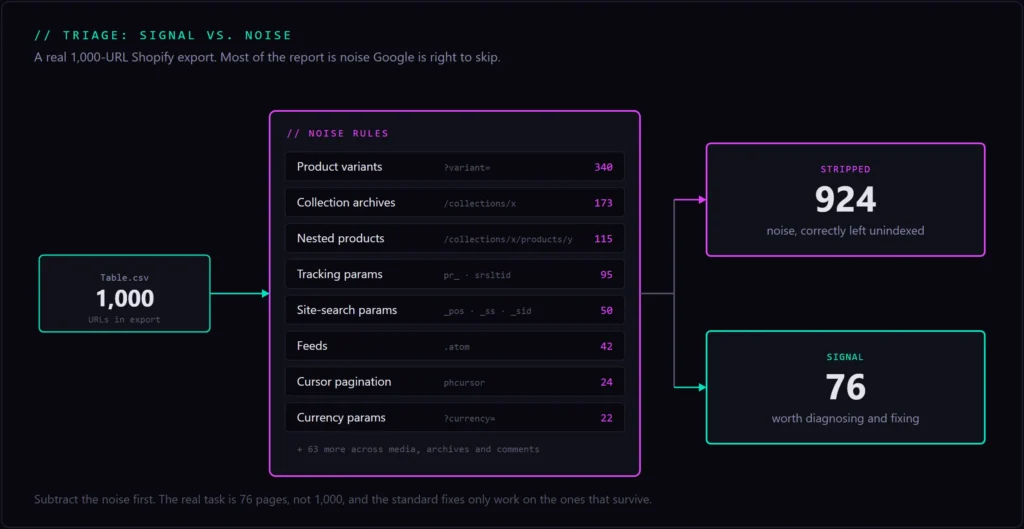
- The noise patterns are platform-specific. A Shopify export I filtered was 924 noise out of 1,000, with 340
?variant=duplicates alone. - Google’s own guidance on this status is “no need to resubmit this URL for crawling.” Fix the page or leave it alone. Re-requesting does nothing.
What “Crawled – Currently Not Indexed” Actually Means
Google crawled the URL and chose not to index it. That’s the whole status. The useful detail is in what “not indexed” does and doesn’t imply.
Crawled vs. indexed vs. ranked
Three separate stages, and this status sits between the first two. Crawled means Googlebot fetched the page. Indexed means Google stored it as a candidate it could show in results. Ranked means it actually competes for queries. “Crawled – currently not indexed” means the URL cleared stage one and stalled at stage two.
Google’s own description is blunt: the page was crawled but not indexed, and “it may or may not be indexed in the future; no need to resubmit this URL for crawling.”
Google indexes selectively, and it says so plainly. You shouldn’t expect every URL on your site to be indexed, and Google doesn’t guarantee that all pages everywhere make it into the index.
One terminology note worth having straight, because it trips people up in older write-ups. The current Page Indexing report files this under Not indexed. The retired Index Coverage report called that same bucket Excluded, which is why you’ll still see “crawled – currently not indexed status: excluded” in older posts and forum threads. Same thing, different label. Either way, it isn’t an error state, and “currently” is doing real work in that phrase.
Crawled vs. Discovered – currently not indexed
These two get conflated constantly, and they point at opposite problems.
Discovered – currently not indexed means Google knows the URL exists, but hasn’t crawled it yet. That’s usually a server-capacity signal. The URL is queued, and Google hasn’t gotten to it, or doesn’t think it’s worth getting to.
Crawled – currently not indexed means Google did fetch the page, looked at it, and passed. That’s a value signal, not an access one.
The fixes diverge from there. Discovered points you at crawl capacity, server response times, and internal links. Crawled points you at the page itself and whether it deserves to be indexed at all. This post is about the second one.
The Mistake Everyone Makes: Treating Every URL as a Problem
Every guide on this topic tells you to improve the affected pages. That advice is correct for part of the report and completely wasted on the rest.
Here’s what that looks like at scale. Two real Search Console properties, same report, same three months.
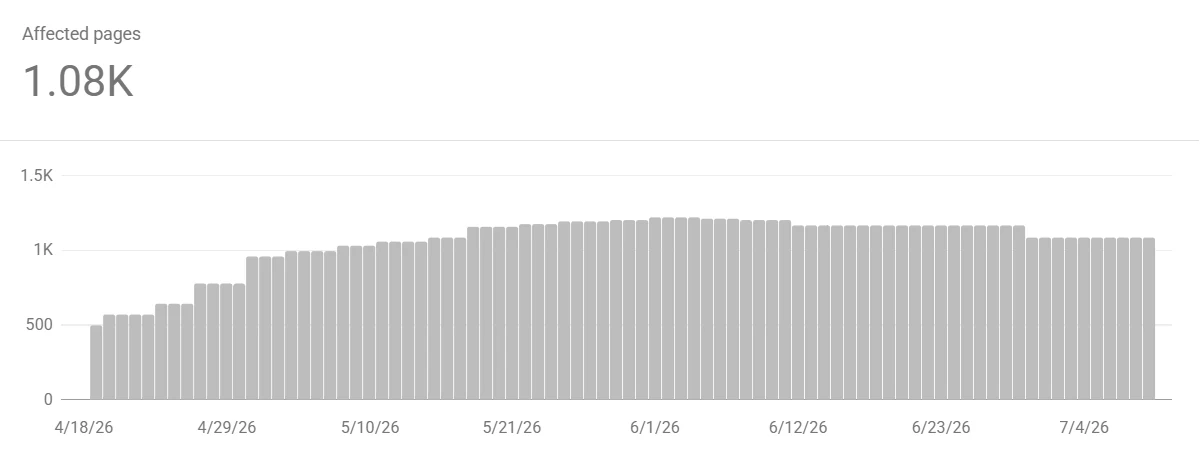
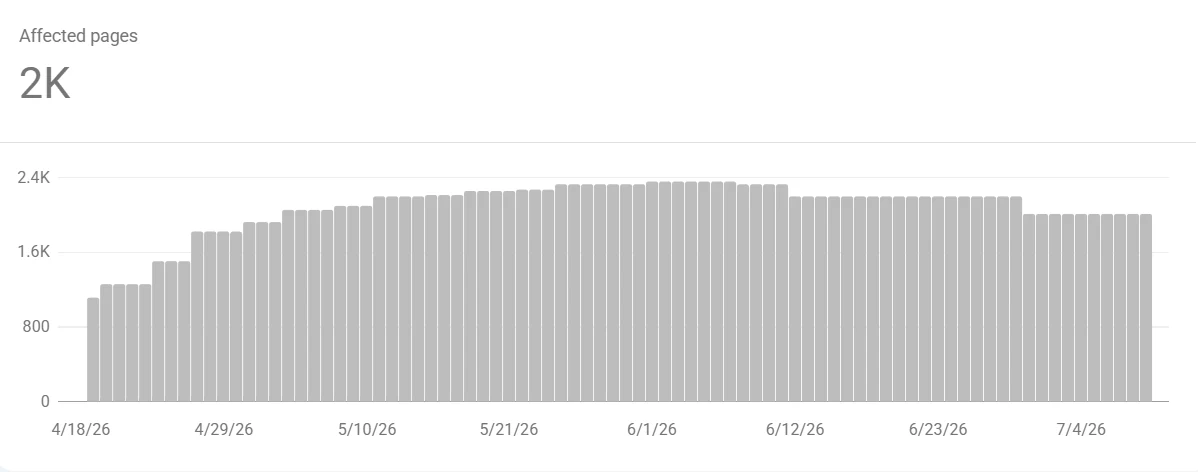
The eCommerce site carries roughly double the count, which is the pattern you’d expect once variants, collection pages, and faceted filters start multiplying crawlable URLs. It’s also why the triage rules further down have to be platform-aware. Neither chart tells you the noise ratio on its own, though. That’s what the export is for.
Most of the report is noise Google is right to skip
A real “Crawled – currently not indexed” report is dominated by URLs you never wanted in the index. RSS and comment feeds. Paginated archive pages. Author and date archives. Tag and category archives. Internal search result pages. Tracking-parameter duplicates of pages that are already indexed at their clean URL.
Google declining to index those is Google behaving correctly. They’re duplicate, thin by design, or pure site furniture. Paginated and feed URLs routinely appear in this report and are fine to leave unindexed. (SEOTesting)
Trying to “fix” them is worse than wasted effort. If you succeed, you’ve pushed pages into the index that dilute your site and compete with the canonical versions. I’ve watched people add unique copy to tag archives to get them indexed. That’s a self-inflicted wound with extra steps.
Key insight
The first move is subtraction, not remediation. Get the noise off the list so what remains is signal, then spend your effort only on the pages that survive.
The proof: a Webflow export that was 96% noise
I wrote my filtering rules against a WordPress mental model and tested them on WordPress-shaped URLs, where they worked fine. Then a real client export broke them.
Webflow site with HubSpot tracking, 788 URLs in the report. My rules said 758 of them were worth keeping. The correct answer was 115 keep, 643 strip. The tool was 96% wrong.
Two patterns did the damage. Webflow namespaces its pagination parameter with the collection list’s own 8-character hex id, so it looks like ?2b485960_page=4 and a plain page or paged match never fires. Worse, two paginated collection lists on one page paginate independently, so Google crawls the cartesian product of both. The rest was HubSpot’s __hstc and __hssc analytics parameters.
A Shopify store told the same story from a different angle: 1,000 URLs, 924 of them noise. 340 were ?variant= near-duplicates of a product already indexed at its base URL. 173 were collection archives, which are category archives wearing a different name.
If you’re eyeballing this report by hand, you’re spending your attention on the wrong 900 URLs.
The same trap shows up well outside Search Console. I recently exported an entire site to markdown with Screaming Frog, and 186 of the 241 rows came back as images, CSS, fonts, and JavaScript. That’s 77% filler before I’d read a single page. Different report, same discipline: triage first, then work.
Step 1: Triage the Report and Strip the Noise
Before you touch a single page, cut the report down to URLs that actually matter. This takes minutes, and it changes what the rest of the work looks like.
Export the report from Search Console
In GSC, go to Indexing, then Pages, then click the “Crawled – currently not indexed” row. Hit Export, and you’ll get a Table.csv of URLs with their last-crawled dates.
One honest limit worth knowing: GSC caps that export at 1,000 sample URLs. On a large site, you’re triaging a representative slice rather than the full affected set. That’s still enough to see the pattern and identify which noise buckets dominate, which is the point of this step.
Filter out the URLs that should never be indexed
Run the export through the free Crawled – Currently Not Indexed filter I built for exactly this job. Upload the CSV, and it strips the noise categories, feeds, pagination, media and attachment pages, author and date archives, category and tag archives, internal search, comments, tracking parameters, CMS system paths, and cart or filter URLs. What’s left is your keep list. Everything removed is shown grouped by reason, so you can audit the calls instead of trusting them.
Two design decisions matter here. It runs entirely in your browser, so the CSV never gets uploaded anywhere. That matters more than it sounds, because a GSC export maps a client’s entire URL structure, and that shouldn’t be sitting on someone else’s server.
Second, it deliberately errs toward keeping near-misses. /feedback/ isn’t a feed. /research/ai-search/ isn’t an internal search page. /reports/2026/ isn’t a date archive. A false strip is far worse than a missed one, because you never see what got silently dropped from your keep list.
What counts as noise on your platform
The noise patterns differ by CMS, and this is exactly where hand-triage and generic advice fall apart.
WordPress: tag, category, author, and date archives, feed/ URLs, ?replytocom= comment links, and attachment pages.
Shopify: ?variant= near-duplicates, /collections/x/products/y (the canonical is /products/y), pr_ recommendation tracking, _pos and _ss site-search parameters, srsltid from Merchant Center, and phcursor pagination.
Webflow: collection-list pagination namespaced with a hex id, like ?2b485960_page=4.
HubSpot: the whole __hs analytics family.
The lesson generalizes past the specific tokens. A Shopify /collections/summer URL is a WordPress /tag/summer in different clothing, and both get the same call. Learn your platform’s furniture and noise becomes obvious at a glance. Miss it and you’ll spend a sprint “fixing” 340 variant URLs that were duplicates the whole time.
Step 2: Diagnose the URLs That Survive Triage
Now the standard advice finally applies, to a much shorter list. When a page you genuinely want indexed gets skipped, it’s almost always one of four things.
Thin, duplicate, or low-value content
The most common reason a legitimate page stalls here is that Google judged it not worth the index slot. Thin content, near-duplicates of a stronger page on your own site, or a page that adds nothing over what’s already indexed elsewhere.
This is Google being selective about index space, and it’s gotten sharper as the web fills with low-effort AI content.
The fix isn’t word count. It’s distinct value. Does this page answer something none of your other pages answer? If you can’t articulate why the page should exist, Google can’t either. Consolidate near-duplicates behind a canonical, merge overlapping thin pages into one good one, and deepen what’s worth keeping against the quality signals Google weighs. Thin content and weak internal linking usually go hand in hand, so check both.
Weak internal linking and orphan pages
A page with no internal links pointing at it reads as unimportant. If nothing on your own site vouches for a URL, Google has little reason to spend an index slot on it.
Orphan pages and pages buried five clicks from the homepage are prime candidates for this status. Fix it by linking from topically related, already-indexed pages, using descriptive anchor text, and ensuring the page sits within a real cluster rather than floating on its own. Internal links are the cheapest indexing signal you actually control.
Search-intent mismatch
Sometimes the page is fine and simply doesn’t match what searchers want for its target query. A listicle where the SERP consists entirely of step-by-step guides. A product page where the results are informational.
Google crawls it, sees it doesn’t fit the pattern of what’s already ranking, and passes. Look at page one for your target query, note the dominant format and depth, and reshape the page to match. Or accept that the URL isn’t aimed at a real query and let it stay out.
Technical blockers: rendered shell, canonicals, schema
Rule out the technical traps before you assume it’s a content problem.
A JavaScript-heavy page can render to an empty shell that Googlebot sees as blank. It gets crawled, there’s nothing worth indexing, and it lands in this report. A canonical tag pointing at another URL tells Google to index that one instead, which is often correct but worth confirming you meant it. A leftover noindex, a soft-404 pattern, or structured data errors can all contribute.
Confirm with URL Inspection’s live test and “View crawled page.” If the rendered HTML is empty, or the canonical isn’t self-referential when it should be, you’ve found your answer. When the blocker turns out to be architectural rather than a one-page fix, that’s where technical SEO help earns its keep.
Step 3: Fix, Request Re-crawl, and Verify
Close the loop on the URLs that survived. Match the fix to the diagnosis, nudge Google, then confirm it landed.
Fix by cause, not with a blanket checklist
Apply the fix that matches what you diagnosed in Step 2. Deepen or consolidate thin content. Add internal links to orphans. Realign the intent mismatches. Clear the technical blocker.
Don’t run all four plays on every URL. That’s the same hand-triage mistake in a different costume, just at a smaller scale. One page might need three internal links and nothing else. Another needs a real rewrite. The triage work is what makes this targeted instead of a scattershot content sprint.
Request indexing is a nudge, not a guarantee
Once a page is genuinely improved, use URL Inspection and Request Indexing to put it back in the queue. For a batch, submit an updated sitemap instead of clicking through dozens of URLs.
Be clear-eyed about what this does. Google’s language is unambiguous: requesting a crawl “does not guarantee that inclusion in search results will happen instantly or even at all,” and requesting a recrawl multiple times for the same URL won’t get it crawled any faster.
Google goes further on this specific status and tells you outright there’s no need to resubmit the URL for crawling. Read that as intended: the queue isn’t your problem, the page is. Request indexing after the fix, never instead of it.
Verify it worked, and set patience expectations
Crawling can take anywhere from a few days to a few weeks, and the GSC report lags behind reality on top of that.
Confirm an individual fix with URL Inspection’s live test and a site: search for the exact URL. For the aggregate, watch the “Crawled – currently not indexed” count in the Pages report trend down over following weeks, not overnight.
Then re-run your triage on the next export so you’re always working current signal instead of last month’s noise. Patience isn’t a fix, but impatience is actively counterproductive: mass re-requesting indexing on pages you haven’t actually improved burns your submission quota and changes nothing.
Conclusion
The report isn’t a backlog. It’s a mixed pile that needs sorting before it needs work. Sort it, and the actual task usually turns out to be a dozen pages instead of a thousand.
Next Steps
- Export the “Crawled – currently not indexed” report from Search Console.
- Run the CSV through the free Crawled – Currently Not Indexed filter to strip the noise categories.
- Diagnose each surviving URL against the four causes above.
- Apply the matching fix, then request a re-crawl.
- Re-triage the next export instead of reworking the old list.
Crawled – Currently Not Indexed Fix Checklist
- Confirm the status sits under Not indexed rather than an error, and expect most of the report to be noise.
- Export the “Crawled – currently not indexed” report from GSC via Indexing, Pages, then the row, then Export.
- Strip the noise first by running the CSV through a filter that removes feeds, pagination, archives, and tracking-parameter duplicates.
- Diagnose each surviving URL by cause: thin or duplicate content, orphan page, intent mismatch, or technical blocker.
- Fix by cause rather than applying every fix to every page, then request a re-crawl or resubmit your sitemap.
- Verify with URL Inspection and a
site:search, then re-triage the next export.
Frequently Asked Questions
What does “Crawled – currently not indexed” mean?
Google crawled the URL but chose not to index it, for now. Google’s own wording is that it may or may not be indexed in the future, with no need to resubmit it. It’s a Not indexed status in the Page Indexing report, not an error, and “currently” means the decision can change.
Is “Crawled – currently not indexed” bad?
Usually not. On most sites the majority of these URLs are feeds, pagination, tag and date archives, and tracking-parameter duplicates you never wanted indexed. It’s only a problem for pages you actually want in the index, which is typically a small slice of the report.
Why does Google crawl a page but not index it?
Google indexes selectively and says outright that not every URL will be indexed. The common reasons are thin or duplicate content, no distinct value over pages already indexed, weak internal linking, a mismatch with what searchers want, or a technical blocker like an empty rendered shell or a canonical pointing elsewhere.
Crawled vs. Discovered – currently not indexed, what’s the difference?
Discovered means Google knows the URL exists but hasn’t crawled it, usually a crawl-budget or server-capacity signal. Crawled means Google fetched it and declined to index it, which is a value signal. Different causes, different fixes.
How do I fix “Crawled – currently not indexed”?
Triage first and strip the URLs that should stay unindexed. Then, for pages you want indexed, fix by cause: deepen thin content, add internal links to orphans, align with search intent, or clear the technical blocker. Request a re-crawl once the fix is live.
Which URLs in the report should I ignore?
Feeds, paginated archives, author, date, tag and category archives, internal search results, and tracking-parameter duplicates of pages already indexed at their clean URL. On Shopify, add ?variant= URLs and collection pages. A filter makes this a single pass instead of an afternoon.
Does “Request Indexing” actually work?
It prompts a re-crawl, but Google states it doesn’t guarantee inclusion instantly or at all, and resubmitting the same URL repeatedly won’t speed anything up. If the reason Google passed is still there, the page gets crawled and skipped again. Fix the underlying issue first.
How long does it take to get indexed after fixing?
Google says crawling can take anywhere from a few days to a few weeks, and the GSC report lags behind the actual index state on top of that. Watch the count trend down across a few weeks rather than expecting an overnight change.