The same scanner that flagged my site for a missing markdown setup came back with two more complaints about my robots.txt: no rules for AI crawlers, and no Content Signals.
Search the topic and every guide tells you the same thing: block the AI bots. Block GPTBot, block CCBot, turn on the “block AI” toggle. I did the opposite. I allowed every AI crawler on the list and instead declared how my content may be used. I want to be cited by AI, so walling off the crawlers that feed AI answers is the last thing I’d do. This is the next entry in an unofficial series where I test things on the site to see what breaks before applying it to client websites. I previously wrote about Google’s Agentic Resource Discovery and how I applied it on this very site.
This time, we’re looking at the robots.txt file updates, including the policy I chose, the exact file, and a WordPress trap that silently breaks robots.txt on a CMS without a single error.
Key Takeaways
- A bare
User-agent: *block isn’t a policy. Scanners now flag the absence of explicit AI-bot rules because silence isn’t a decision. - The whole internet says “block.” For most businesses that’s the wrong default: blocking doesn’t stop bad actors, and it removes you from the AI answers where discovery now happens.
- I allowed the crawl and declared terms with one Content Signal:
search=yes, ai-train=no, ai-input=yes. Index me, cite me, but don’t train on me for free. - robots.txt is a request, not a fence. And per RFC 9309, a named bot ignores your
*block, so every directive has to be repeated in each bot’s own group. - On WordPress, a physical robots.txt file silently overrides the virtual one your plugins write to. If it exists, it’s your only robots.txt.
The Two Things My robots.txt Was Missing
My file had a wildcard rule and a crawl-delay, and I’d assumed that was enough. It wasn’t a policy. It was silence. The scanner named two specific gaps.
No AI-specific crawler rules
A single User-agent: * block says nothing about AI crawlers on purpose or otherwise. It’s ambiguous by design, and per the protocol a named bot can ignore it entirely (more on that below). That’s why scanners now flag the absence of explicit AI-bot groups: silence isn’t consent, refusal, or a documented choice. It’s just an unanswered question. Name the bots, even to allow them, and you’ve put a decision on the record instead of leaving it to inference.
No Content Signals
Content Signals are a separate, newer layer: a way to declare how your content may be used, on top of the old allow-and-deny crawl rules. Cloudflare introduced them on September 24, 2025, and automatically added them to the robots.txt of the millions of domains on its managed service. (Cloudflare) My file had none. So I was granting crawl permission while stating no usage preference at all, which is exactly the gap between “you can read this” and “here’s what you may do with it.”
Block, Allow, or Declare: Picking an AI-Crawler Policy
Every site owner is making this decision whether they realize it or not. There are three real options, and I rejected the popular one on purpose.
Why the whole internet says “block” (and why I didn’t)
Look at the search results for this topic and they’re a wall of blocking: Cloudflare, Netlify, and Akamai selling toggles, a community repo shipping blocklists, publishers framing it as protecting content for future licensing deals. That’s a legitimate stance for a large media site sitting on licensable archives. It’s the wrong default for almost everyone else, for two reasons.
First, blocking in robots.txt doesn’t actually stop a determined scraper. It’s a request, not a wall (I’ll come back to that). Second, it does pull you out of the AI answers and search features where discovery is increasingly happening. For a business that wants to be found and cited, blocking the crawlers that feed those answers is self-sabotage dressed up as caution. The most-referenced community resource on the topic is a repo that ships ready-made blocklists for robots.txt, Apache, and nginx and recommends blocking outright. (ai-robots-txt)
The stance I chose: allow the crawl, declare the terms
I allowed every AI crawler and set one Content Signal across the file: search=yes, ai-train=no, ai-input=yes. In plain English, that’s index me, cite me in AI answers, but I’m declining to hand my content to model training for free.
Those three dimensions are the whole point of Content Signals. search covers traditional and AI search indexing, the thing you’ve always wanted. ai-input covers real-time use in AI answers, which is the citation you’re actively chasing if you care about AI search. ai-train covers using your content to fine-tune model weights, and that’s the one most publishers reserve, because it’s the use with no link back and no traffic. Allowing the crawl keeps me discoverable; the signal states the terms of use. You don’t have to choose between visibility and a position on training.
Can robots.txt actually stop AI crawlers?
No, not on its own, and it’s worth being honest about that. robots.txt, and Content Signals with it, is a request that compliant operators honor. The major crawlers, GPTBot and ClaudeBot among them, do obey it. But a Disallow or an ai-train=no does nothing to a crawler that ignores the rules. Stopping those needs a firewall or an edge rule, not a line in a text file. So treat these directives as a stated preference with real weight among the companies that matter, not as DRM. Anyone who tells you a robots.txt line “blocks” a bad actor is overselling it.
The AI Crawlers Worth Naming
You can’t set a policy for bots you can’t name. There are two buckets that matter for your decision, plus one entry that almost everyone misreads.
Training crawlers vs. answer engines
Sort the zoo into two buckets, because your policy can differ by what the bot is for.
Answer and search engines fetch pages to cite in real time: OAI-SearchBot and ChatGPT-User from OpenAI, PerplexityBot, Claude-Web and Claude-User, Applebot. These are the citations you want, so allow them. Training and dataset crawlers collect content to train models: GPTBot (OpenAI), ClaudeBot and the legacy anthropic-ai (Anthropic), CCBot (Common Crawl), Bytespider, Applebot-Extended, Meta-ExternalAgent. Allow the crawl if you like, but this is the bucket your ai-train=no signal is talking to. You don’t need to memorize the list; a community-maintained master list tracks the tokens as they change.
| User-agent | Operator | What it feeds | My policy |
|---|---|---|---|
| Answer / search engines (real-time citation) | |||
OAI-SearchBot | OpenAI | ChatGPT search results | Allow · cite |
ChatGPT-User | OpenAI | User-triggered fetches in ChatGPT | Allow · cite |
PerplexityBot | Perplexity | Perplexity answers | Allow · cite |
Claude-Web / Claude-User | Anthropic | Claude answers | Allow · cite |
Applebot | Apple | Siri / Spotlight | Allow · cite |
| Training / dataset crawlers (model building) | |||
GPTBot | OpenAI | Model training | Allow crawl · ai-train=no |
ClaudeBot / anthropic-ai | Anthropic | Model training | Allow crawl · ai-train=no |
CCBot | Common Crawl | Open training dataset | Allow crawl · ai-train=no |
Google-Extended | Gemini / Vertex AI | Allow · ai-train=no | |
Applebot-Extended | Apple | Apple AI training | Allow crawl · ai-train=no |
Bytespider | ByteDance | Model training | Allow crawl · ai-train=no |
Meta-ExternalAgent | Meta | Meta AI | Allow crawl · ai-train=no |
The one everyone gets wrong: Google-Extended
Google-Extended isn’t a crawler and doesn’t fetch anything. It’s an opt-out token that governs whether your already-crawled content feeds Google’s generative AI, Gemini and Vertex. Googlebot still crawls for Search no matter what you set. The catch is that it’s a single coarse switch covering both AI training and AI grounding, so you can’t tell Google “ground yes, train no” through robots.txt alone. I left it allowed and let the Content Signal carry the nuance it can’t. That’s the honest limitation nobody spells out.
Writing the Rules (and Why Most Guides Get the Groups Wrong)
The mechanics are simple, except for one rule in the protocol that quietly breaks naive robots.txt files. Get this part right and the rest is copy-paste.
The most-specific-group rule that trips everyone up
A crawler obeys only the single most-specific User-agent group that matches it. It doesn’t merge your User-agent: * block with its own named block. That’s the rule in RFC 9309, and it has a consequence most guides skip: if you put a Content-Signal or a Disallow only under User-agent: *, then GPTBot, which matches its own GPTBot group, never sees it.
So every directive you want a named bot to honor has to be repeated inside that bot’s own group. It looks redundant when you write it out, twenty groups each carrying the same Content-Signal line. It’s also the only way the rules actually apply to the bots you’re targeting: under the protocol, a crawler obeys the group matching its own name and falls back to the * group only when no named group matches, so the two are never merged. (RFC 9309)
Setting Content Signals (search / ai-train / ai-input)
The syntax is one line inside a user-agent group: Content-Signal: followed by search, ai-train, and ai-input, each set to yes or no. Because of the group rule above, it goes in the * block, for search engines and unlisted bots, and again in each named AI-bot group. The canonical line I used is Content-Signal: search=yes, ai-train=no, ai-input=yes, and it layers on top of your Allow and Disallow rules rather than replacing them. Crawl permission and usage preference are two different statements living in the same group. (Content Signals Policy)
The file I actually shipped
The structure is a * group with the Content Signal and open crawling, then a group for each answer engine and each training crawler, every one repeating the signal with Allow: /, and finally the file-level Sitemap:, Agentmap:, and Entitymap: lines. You can read the whole thing live: curl https://toddmorourke.com/robots.txt.
Two deliberate calls in there. I dropped Crawl-delay, because Google ignores it and it only throttles the honest bots that bother to read it. And I list the AI bots explicitly even though I allow all of them, because allowing them on the record is itself the policy. An empty wildcard says nothing; a named Allow says I looked at this and decided.
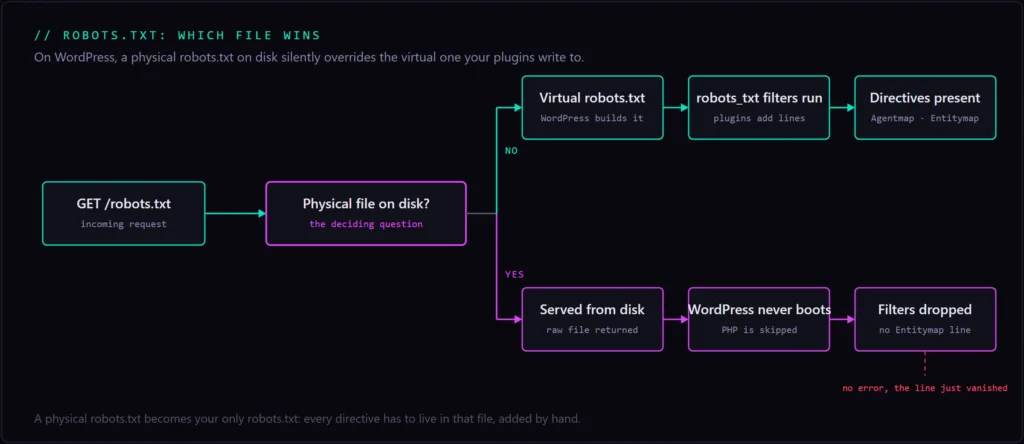
The WordPress Trap: Physical vs. Virtual robots.txt
Here’s the part that made my robots.txt quietly wrong for months, and it’s invisible on any CMS. Nothing errors. The file just stops telling the truth.
A file on disk silently overrides your CMS
WordPress serves a virtual robots.txt it builds at request time, and plugins add lines to it through the robots_txt filter. That’s how SEO plugins inject a Sitemap: line, and how my own plugins add Agentmap: and Entitymap: directives. It all works, right up until a physical robots.txt file exists in the web root.
The moment that file exists, the server returns it directly. WordPress never boots for that request, and every one of those filters silently no-ops. No warning, no log line. The file just quietly stops reflecting whatever your plugins think they’re publishing. Anyone who has ever hand-edited robots.txt on WordPress has probably done this without knowing it.
How I caught it: my Entitymap line was missing
I’d hand-added the Agentmap directive to that same file months earlier, so it was live and I stopped thinking about it. Later I shipped a plugin to advertise my machine-readable entity map with an Entitymap: line through the robots_txt filter. It never showed up in production.
Same cause: the physical file was winning, so the filter never ran. The identical trap silently drops the Sitemap: line most SEO plugins rely on. The lesson is blunt. On WordPress, if a physical robots.txt exists, it is now your only robots.txt, and every directive has to live in that one file, added by hand.
Deploying and Verifying
Ship it, then prove it two ways, because passing a scan and actually being reachable are different things.
Edit the physical file and re-scan
Because the physical file wins, I edited it directly in the web root. It’s a static file, so there’s no cache layer or PHP to fight, which is a rare bit of simplicity on this host. Then I re-ran the scan. Eyeball it live with curl https://toddmorourke.com/robots.txt, and the two checks, one for AI-bot rules and one for Content Signals, both flip to pass. Just remember the manual reality: no plugin will manage this file once it’s physical. Treat it like any hand-deployed asset and keep a version-controlled copy so the next edit doesn’t start from a guess.
Policy is not reachability, so check both
robots.txt states what a crawler may do. It says nothing about whether the crawler can physically reach your pages. A WAF, an aggressive bot rule, or a 403 to unfamiliar user-agents can block the very AI crawlers you just invited, and your friendly robots.txt won’t save them. So the second check is reachability. I built a tool to check whether an AI crawler can even reach your pages, per user-agent, because policy and reachability are two separate gates. Set only the first and the permissive robots.txt is theater.
Conclusion
A lone wildcard in your robots.txt looks hands-off, but the tools reading your site now read it as an unanswered question, and they treat it accordingly. The useful work isn’t deciding to block or not. It’s making a real choice, writing it so the named bots actually honor it, and making sure the file you edited is the file the server serves. On WordPress that last part is where most people, me included, quietly go wrong.
Next Steps
- Curl your own robots.txt and confirm whether it’s WordPress-virtual or a physical file sitting on disk.
- Decide an actual policy: block, allow, or allow-and-declare. Pick one on purpose.
- Write named
User-agentgroups for the AI bots you care about, and repeat your Content Signal in each of them. - If the file is physical, put every directive in it by hand and keep it version-controlled.
- Verify with a re-scan for the rules and signals, then confirm the bots can actually reach you.
If you want your site both legible and correctly gated for AI search and agents, answer engine optimization services.
AI-Crawler robots.txt Checklist
- Audit your current robots.txt: curl it and confirm whether it’s WordPress-virtual or a physical file on disk.
- Decide your policy: block, allow, or allow-and-declare (allow the crawl, declare usage terms).
- Add explicit
User-agentgroups for the AI bots you care about, both answer engines and training crawlers, not just*. - Set a
Content-Signalline (search, ai-train, ai-input) and repeat it in every group, because named bots ignore the*block. - Handle
Google-Extendedknowingly: it’s a coarse opt-out token, not a crawler. - If a physical robots.txt exists, edit that file directly and keep a version-controlled copy.
- Verify: re-run an agent-readiness scan for the rules and signals, then confirm the bots can actually reach you.
Frequently Asked Questions
Should you block AI bots from your website?
For most businesses, no. Blocking removes you from AI answers and search features, and it doesn’t stop non-compliant scrapers anyway. Allowing the crawl while declaring usage terms with Content Signals is the stronger default. Large publishers protecting licensable archives are the main exception.
Can robots.txt actually stop AI crawlers?
Not on its own. It’s a request that compliant crawlers like GPTBot and ClaudeBot honor, not a technical barrier. A crawler that ignores the rules keeps crawling. Stopping those requires a firewall or an edge rule, so treat robots.txt as a stated preference, not a lock.
How do you block GPTBot, ChatGPT, Claude, or Perplexity in robots.txt?
Add a named User-agent group for each bot, GPTBot, OAI-SearchBot, ClaudeBot, PerplexityBot, and so on, with Disallow: /. Because of RFC 9309, the rule has to sit in each bot’s own group, not just under the * wildcard, or the named bots won’t apply it.
What are Content Signals in robots.txt?
A 2025 standard for declaring how your content may be used: search, ai-train, and ai-input, each set to yes or no, layered on top of your crawl rules. Compliant AI operators read them as usage preferences, separate from whether they’re allowed to crawl the page at all.
What’s the difference between ai-train, search, and ai-input?
search is indexing for search, including AI search. ai-input is real-time use in AI answers, which is the citation you generally want. ai-train is using your content to train model weights, the use with no link back, which is the one most publishers decline while allowing the other two.
Does blocking or allowing AI bots affect SEO or Google rankings?
Blocking Googlebot hurts Search, but Google-Extended only governs Gemini use and has no effect on ranking. Allowing the AI answer crawlers doesn’t hurt SEO, and it can win you citations in AI search. The two systems are separate, so a training opt-out won’t cost you rankings.
llms.txt vs robots.txt: which one controls AI crawlers?
They do different jobs. robots.txt is your access and usage policy: who may crawl, and how the content may be used. llms.txt does a different job, a curated content and discovery file that points LLMs at your best material. Neither replaces the other; they work together.