AI agents are starting to act, not just answer. And the moment an agent needs to actually do something on your behalf, it hits a wall: how does it find the right tool, API, or service to call, out of the entire web, at runtime? There has been no standard answer. On June 17, 2026, Google and around eleven partners shipped one: Agentic Resource Discovery, governed under the Linux Foundation. (Google Developers Blog) Since then the internet has filled with posts explaining what it is. Almost nobody has actually built it. So I did, on the exact site you are reading right now. This is the honest account of what conformed, what broke, and what I would tell you to check before you ship your own.
Key Takeaways
- Agentic Resource Discovery (ARD) is the discovery layer for the agentic web: a standard way for AI agents to find and verify the tools your site exposes.
- Publishing the file is necessary and nowhere near sufficient. An empty catalog discovers nothing useful. You have to expose a real, callable capability.
- Two things actually broke in practice: cPanel silently shadowed my
/.well-known/route, and the real-world risk is a firewall blocking crawler user-agents. - This is agent engine optimization. The early-mover window is open, and most launch partners had not even shipped a catalog days after launch.
What Agentic Resource Discovery actually is
ARD is simpler than the launch coverage makes it sound. It has two moving parts, and once you see them the whole model clicks.
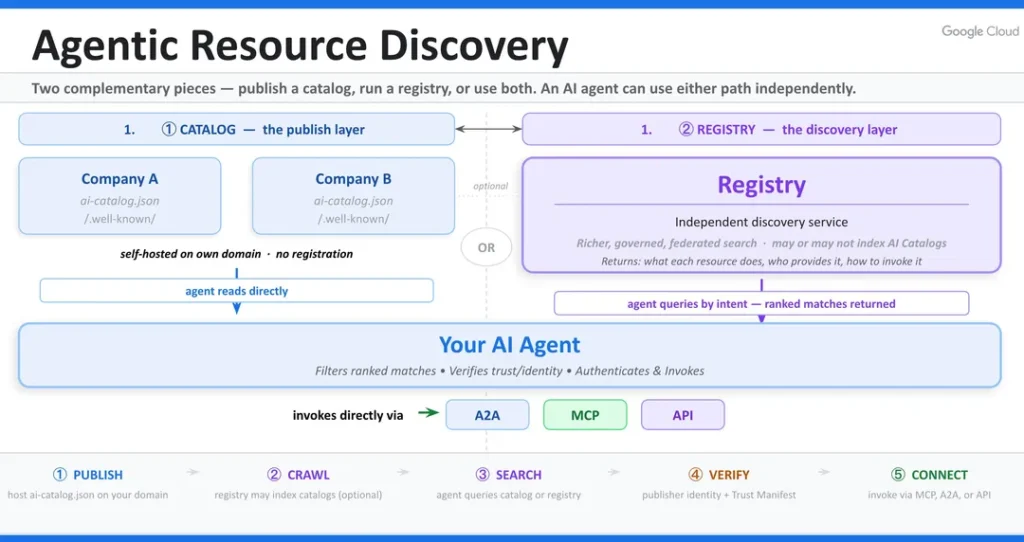
The two primitives: catalogs and registries
ARD has exactly two components, and the spec is deliberately small.
The first is a static file, ai-catalog.json, that a site publishes at /.well-known/. Each entry in it describes one capability: an identifier, a media type that tells the agent what protocol the capability speaks, and a link to the thing itself. Those entries can point at MCP servers, agent-to-agent (A2A) agent cards, individual skills, plain APIs, or even nested catalogs on other domains. It is a flat, machine-readable menu, and because it is a static file it costs almost nothing to host and will not fall over under load.
The second is registries: services that crawl those catalogs, index the entries, and answer agents’ natural-language queries with ranked matches plus the trust metadata an agent needs to decide whether to connect. (Agentic Resource Discovery specification)
The division of labor is clean. You publish the menu, registries are the search engine for it, and agents query the registries by intent rather than hard-coding a URL. The model is federated, so anyone can run a registry and registries can cross-reference each other. There is no central index and no gatekeeper, which is the part that makes the agentic web feel like the early web rather than an app store.
The three questions every agent has to answer
ARD exists to answer three questions an agent has at runtime: where does the right capability live, which one should it actually use, and how does it verify the capability is safe to connect to. (Google Developers Blog) Today there is no consistent way to answer those across organizations. ARD standardizes all three, with domain ownership as the trust anchor.
What a discovery query actually looks like
Walk it through with the capability I published. Say an agent is told, in plain language, to check the keyword density of a draft. It has never heard of my site. Here is the full lifecycle:
- The agent sends its intent to a registry: “find a tool that can analyze SEO keyword density.”
- The registry matches that intent against the
representativeQueriesin every catalog it has indexed, including the ones I wrote for my entry, and ranks the candidates by semantic similarity. - It returns my
seo-toolsentry, complete with thedid:webidentity and a link to the MCP server card. - The agent verifies that the identity resolves to
toddmorourke.combefore trusting it, then connects to the MCP server named in the entry. - It calls the
keyword_densitytool and gets structured results back.
Nothing was pre-configured and no developer wired my tool into that agent in advance. The agent found a capability it had never heard of, confirmed who published it, and used it. That is the entire point of the standard, and it is why the words you put in representativeQueries matter as much as any title tag.
How it differs from robots.txt, sitemaps, llms.txt, and OKF
ARD is to capabilities what the XML sitemap is to pages. The distinction matters, because the agentic web now has several discovery files and they do different jobs. Crawler files like robots.txt and sitemaps help search engines discover your pages. Content files like llms.txt and Open Knowledge Format (OKF) expose your written content for models to read. ARD is the only one that exposes callable tools, agents, and APIs.
The cleanest way to hold it: OKF exposes your content to agents, ARD exposes your capabilities. They are siblings, not substitutes. If you haven’t published an OKF bundle yet, my free OKF Generator builds one from your site; once it’s live, ARD is the next file in the set.
| Standard | What it exposes | Consumer | Discovery file |
|---|---|---|---|
| robots.txt | Pages to crawl | Search crawlers | robots.txt |
| XML sitemap | Page URLs | Search crawlers | sitemap.xml |
| llms.txt | Content for models | LLMs | llms.txt |
| OKF | Structured content | AI agents | knowledge bundle |
| ARD | Callable tools and agents | AI agents and registries | ai-catalog.json |
Why SEOs should care: agent engine optimization
If you optimize for AI search, this is the next layer, and it is a layer most of your competitors do not know exists yet.
From being cited to being callable
Answer engine optimization got you cited in AI answers. ARD gets your tools invoked by AI agents. That is the whole shift in one sentence. Being cited means an agent mentions you in a response. Being callable means an agent uses you to get something done. The second is a far deeper relationship, and ARD is how you opt into it.
I think of this as agent engine optimization: the discovery layer that sits on top of everything you already do to get cited in AI search. Same instinct as AEO, one level up the stack.
The agentic shift is a structural change, not a feature
This is not a passing format. Agents are becoming a primary way work gets done, which is the same argument behind agentic-led growth and rebuilding teams for the agentic age. When the buyer in the room is an agent, the brands it can actually call have an advantage the brands it can only read about do not. ARD is how you make sure you are in the first group.
How I implemented ARD on this site
Here is exactly what I shipped, in the order an agent would encounter it. No theory, just the build.
The ai-catalog.json file and a did:web identity
The catalog is the menu; the did:web identity is what makes it trustworthy. A did:web is a decentralized identifier anchored to your domain, so a registry can confirm the catalog genuinely belongs to you. Here is the actual catalog I published, trimmed to the essentials:
{
  "specVersion": "1.0",
  "host": {
    "displayName": "Todd M. O'Rourke, SEO Consultant",
    "identifier": "did:web:toddmorourke.com",
    "documentationUrl": "https://toddmorourke.com/tools/"
  },
  "entries": [
    {
      "identifier": "urn:air:toddmorourke.com:server:seo-tools",
      "displayName": "Todd O'Rourke SEO Tools (MCP)",
      "type": "application/mcp-server-card+json",
      "url": "https://toddmorourke.com/.well-known/mcp/seo-tools.json",
      "capabilities": ["keyword_density", "serp_preview"],
      "representativeQueries": [
        "check the keyword density of an article",
        "preview how a page title and meta description appear in Google"
      ]
    }
  ]
}
Watch the strict parts, because the launch posts gloss over them. The identifier scheme is urn:air:, not urn:ai:. The media type for an MCP server is application/mcp-server-card+json. The host identifier is a did:web. And representativeQueries must contain two to five items. I validated the file against the official JSON Schema before shipping. (ards-project/ard-spec)
The four discovery signals
The spec gives registries and agents four ways to find your catalog, so I wired all four. Belt and suspenders: the more signals you emit, the more discovery paths succeed.
| Signal | Where it lives | Example |
|---|---|---|
| Well-known file | Your domain root | /.well-known/ai-catalog.json |
| robots.txt directive | robots.txt | Agentmap: https://…/ai-catalog.json |
| HTTP header | Every page response | Link: <…/ai-catalog.json>; rel=”ai-catalog” |
| HTML head link | Page head | <link rel=”ai-catalog” href=”…”> |
The part that actually matters: a tool an agent can call
An empty catalog discovers nothing useful. This is the lesson most “how to add ARD” takes miss entirely: shipping the file is necessary and nowhere near sufficient. The value is the capability you expose, not the JSON that points at it.
So I exposed real ones. I took two free tools that already live on this site, the Keyword Density Checker and the SERP Simulator, and wrapped them as a live MCP server an agent can invoke. MCP, the Model Context Protocol, is the standard agents use to call external tools. Then I confirmed it works end to end: a real tools/call came back with real keyword-density math and a live SERP preview, not a canned response. The catalog is the menu; these are the dishes.
Key insight
An empty catalog is worthless. Expose at least one real, callable capability, or do not bother.
What broke (and what you should check)
Now the honest part. Four findings the announcement posts and the analysis pieces do not mention, because you only hit them when you actually deploy.
cPanel quietly shadows your /.well-known/ route
My catalog route returned a 404 even though the plugin was active and the code was correct. The cause took a minute to find: cPanel ships a real /.well-known/ directory on disk for automatic SSL certificates. Apache serves that path straight from the filesystem and never hands the request to WordPress, so my dynamic route never ran. WordPress only handles a URL when it is not a real file or directory, and the directory existed.
The fix is boring and bulletproof: serve ai-catalog.json and its companions as static files in that directory instead of generating them dynamically. If you are on cPanel or most shared hosting, plan for static files from the start.
Heads up
On cPanel and WordPress, a dynamic /.well-known/ route gets shadowed by the real directory. Ship ai-catalog.json as a static file.
The WAF discoverability trap (and a Turnstile myth-bust)
Your catalog can be live, public, and completely invisible to registries at the same time. If a web application firewall blocks unfamiliar user-agents, a registry crawler gets a 403 while your browser gets a 200, and you never know. (Suganthan Mohanadasan) This is the single most important operational thing to verify.
So I tested it. I requested my catalog as named bots, as a browser, and as raw Python clients, and every one returned 200 on my host. Here is the myth-bust that surprised some people: I run Cloudflare Turnstile on my contact form, but Turnstile is a form CAPTCHA, not the Cloudflare WAF. It never touches the catalog path. Do not assume your setup blocks or allows anything. Test your own stack.
| User-agent | Status |
|---|---|
| ClaudeBot | 200 |
| GPTBot | 200 |
| Mozilla/5.0 (browser) | 200 |
| python-requests | 200 |
| Python-urllib | 200 |
Want to run this check on your own site? I turned it into a free tool: the ARD Checker fetches your ai-catalog.json, validates it against the official schema, confirms all four discovery signals, and probes the file as five crawler user-agents, then grades the result. For the full method, including a live audit of two real sites, see how to check if AI agents can find your site.
Conformance is stricter than the blog posts imply
Several of the launch writeups show loose, friendly examples that will not validate. The real schema is picky. It is urn:air:, not urn:ai:. The MCP media type is application/mcp-server-card+json, not a casual mcp-server. representativeQueries is capped at two to five entries. The host object rejects unknown properties outright. Run your file through the official JSON Schema rather than trusting a copied snippet, or you will publish something registries quietly reject.
A bonus: conformance testing surfaced a real production bug
Here is the kind of thing hands-on work turns up. While checking my tool output, I noticed numbers like 35.71 coming back as 35.7100000000000008. My host had a high float-precision setting that was expanding every rounded number, and it had been silently doing the same thing inside my public Keyword Density Checker. I forced the correct precision and fixed both at once. Building the thing found a bug that reading about the thing never would have.
How to test your own ARD implementation
Here are the exact checks I ran, so this is something you can act on, not just a story.
Validate the catalog and the four signals
Confirm the basics in order: fetch /.well-known/ai-catalog.json and check it returns valid JSON with specVersion set to 1.0, then confirm the head link, the Link header, and the Agentmap line in robots.txt. Finally, validate the file against the official JSON Schema.
curl -s https://yourdomain.com/.well-known/ai-catalog.json | jq .
curl -sI https://yourdomain.com/ | grep -i '^link:'
curl -s https://yourdomain.com/robots.txt | grep -i Agentmap
Run the user-agent WAF test
Request your catalog as several user-agents and confirm every one returns 200. If the Python clients come back 403 while a browser succeeds, your firewall is hiding you from registries, and you need to allowlist /.well-known/.
U=https://yourdomain.com/.well-known/ai-catalog.json
for ua in "ClaudeBot" "GPTBot" "Mozilla/5.0" "python-requests/2.31" "Python-urllib/3.11"; do
  printf '%-22s -> ' "$ua"; curl -s -o /dev/null -w '%{http_code}\n' -A "$ua" "$U"
done
Actually call your MCP endpoint
This is the proof that matters. Send a tools/list and then a tools/call to your endpoint and confirm it returns real results. Discovery without a working call is theater, so do not skip it.
What this means for your SEO strategy
The practical question is not whether ARD matters. It is what you should do this quarter.
Ship it now, but only with a real capability
The discovery layer is cheap to add and the early-mover window is wide open. Three days after launch, most of the partner companies on the announcement had not published a catalog of their own. (Suganthan Mohanadasan) If you have a real tool, agent, or API to expose, ship the catalog this quarter and be early. If you do not, building one is busywork. Get the capability first.
Where ARD fits with AEO, GEO, and OKF
These layers compound. Content standards like OKF and llms.txt feed your words to models. AEO and GEO earn you citations in AI answers. ARD exposes your capabilities to agents. Together they are the agent engine optimization stack, and each layer you add raises the odds an agent finds you, trusts you, and uses you. I also keep an AI information page as the identity layer: a plain-language source that tells the models who I am before they ever call a tool. The newest layer sits lower still, in DNS itself. I tried to publish DNS-AID records so agents can discover this site over DNS, and my host could not make the record. That is a story worth reading before you attempt it.
The bottom line
The agentic web is going to reward the sites that are callable, not just readable, and the cost of getting in early is an afternoon. Here is where to start:
- Audit whether you have a tool, agent, or API worth exposing to AI agents.
- Publish a conformant
ai-catalog.jsonand validate it against the official schema. - Wire all four discovery signals: the well-known file, robots Agentmap, the Link header, and the head link.
- Test it the way a registry would: across user-agents, and with a real tool call.
If you want help getting your site ready for the agentic web, explore AEO & AI Search consulting.
Frequently asked questions
What is agentic resource discovery (ARD)?
Agentic Resource Discovery is an open specification, launched by Google and partners in June 2026, that lets AI agents find and verify the tools, APIs, and agents a website offers. Sites publish a catalog file, and registries index it so agents can discover capabilities by natural-language intent.
What is an ai-catalog.json file and where does it go?
It is a machine-readable list of the agentic capabilities your site exposes, such as MCP servers, agents, and APIs. You publish it at /.well-known/ai-catalog.json on your domain. Each entry has an identifier, a type, and a link to the capability the agent can connect to.
How is ARD different from robots.txt, sitemaps, llms.txt, and OKF?
Those files expose pages or content. Robots.txt and sitemaps help crawlers find pages; llms.txt and OKF expose your written content to models. ARD is the only one that exposes callable capabilities: the tools and agents an AI can actually invoke, not just read.
Do I need ARD if I already do AEO and GEO?
They solve different problems. AEO and GEO get you cited in AI answers. ARD gets your tools called by AI agents. If you only publish content, AEO is enough for now. If you offer tools, APIs, or agents, ARD is how AI systems discover and use them.
How do AI agents discover and verify a website’s tools?
An agent queries a registry by intent, the registry returns matching capabilities from indexed catalogs, and the agent verifies the publisher through the domain-anchored identity before connecting. Verification uses the did:web identifier in the catalog, which ties the listing to the domain that published it.
How do I test that my ai-catalog.json is actually discoverable?
Fetch the file and confirm valid JSON, validate it against the official schema, and check that all four discovery signals are present. Then request the file as several user-agents to make sure a firewall is not blocking crawlers, and send a real call to your endpoint to confirm the capability works. You can run the file, schema, signal, and crawler-reachability checks automatically with my free ARD Checker.