You can publish a flawless ai-catalog.json, sign every entry, and still be completely invisible to AI agents. Your browser loads the file fine. A registry crawler gets a 403 and moves on. You’d never know, because the failure occurs on a request you never make or see.
That gap matters more every month. Agents are starting to pick tools at runtime instead of being hardcoded, and the way they find those tools is Agentic Resource Discovery (ARD). If a registry can’t crawl your catalog, or your catalog doesn’t pass the spec, you don’t exist to the agentic web. So I built a free agentic resource discovery checker to test it, then ran it on real sites. Here’s the method behind it, what a passing site looks like, and the two failures I found on the site that inspired the tool.
When I implemented ARD on this site, the hardest part was proving anything could actually read it. Credit for this work goes to Suganthan Mohanadasan, who was the first person I saw discuss this process in detail.
Key Takeaways
- Publishing the catalog isn’t the same as being discoverable; a live file can still be invisible.
- Crawler reachability is the silent killer: a firewall can 403 the crawler while your browser sees 200.
- The ai-catalog schema is strict;
urn:air:(noturn:ai:) and the two-to-five query cap trip people up. - Don’t assume, verify. Even an expert’s well-built site can fail two of six checks.
What “discoverable by AI agents” actually means
ARD is how an agent finds and verifies the tools your site exposes. You publish a machine-readable ai-catalog.json at /.well-known/, list your capabilities (MCP servers, agent cards, APIs), and add a few signals that point crawlers to the file. Registries crawl those catalogs so an agent can ask “who can do X” and get a verified answer. The full backstory is in the implementation post; this piece is about checking yours.
This is a different layer from the crowded “AI visibility” checker field. Those tools test robots.txt, llms.txt, and schema, which decide whether an LLM will cite your content. ARD decides whether an agent can call your tools. One is about being quoted. The other is about being used.
The 6 checks that decide whether agents can find you
A real ARD audit comes down to six checks in three groups: the catalog file and its schema, the four discovery signals, and crawler reachability. Get all six and an agent can find, trust, and reach you. Miss one and the chain can break silently.
The catalog file and its schema
Start with the file itself, then prove it’s valid. Check one: /.well-known/ai-catalog.json resolves and returns valid JSON. Check two: it conforms to the official ai-catalog JSON Schema, which is published as Draft 2020-12. (ai-catalog JSON Schema, ards-project)
Schema conformance is where good intentions die, because the spec is strict in ways you won’t catch by eye. Entry identifiers must match the urn:air: pattern, not urn:ai:. Each entry carries either a url or inline data, never both. And representativeQueries is capped at two to five items. Miss any of these and a strict registry rejects the entry, even though the file looks fine in your editor.
The four discovery signals
A registry has to find the catalog before it can validate it, and ARD gives it four ways to do that. The well-known file itself. A robots.txt Agentmap: directive. A Link: HTTP header on your pages. And a <link rel="ai-catalog"> in your homepage <head>. Different crawlers look in different places, so this is deliberately belt-and-suspenders. Having one isn’t enough; you want all four pointing at the same file.
Crawler reachability: the make-or-break check
This is the one that fails silently, and it’s the reason I built the tool. Your catalog can be live, valid, and signposted four ways, and still return a 403 to the crawler that matters. A web application firewall sees an unfamiliar user-agent, decides it’s a bot worth blocking, and serves a denial. Your browser sends a normal user-agent and gets a clean 200, so everything looks healthy from where you sit.
The test is to fetch the catalog as several different user-agents: named bots like ClaudeBot and GPTBot, a normal browser string, and raw clients like Python-urllib and python-requests. If the Python clients get blocked while browsers pass, registry crawlers can’t read you. One honest caveat: a server-side test like this catches user-agent blocks, which are the common case, but not IP-reputation blocks that only hit a crawler on a different network. You can check your own domain with the free ARD Checker in a few seconds.
A real audit: a clean A vs. a surprising C
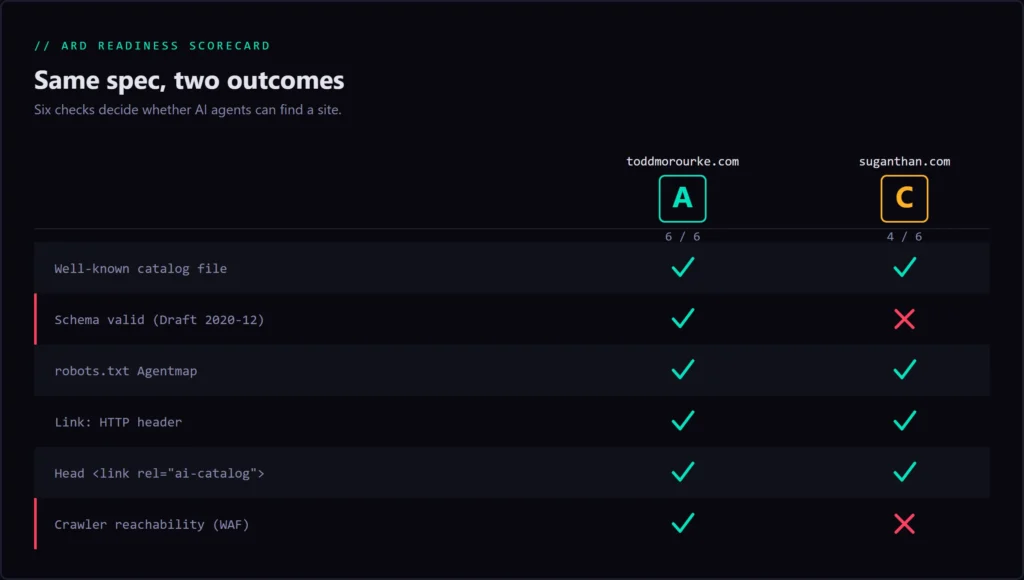
Here’s the proof, run on two real sites. This site, toddmorourke.com, scores A: six of six. Then I ran the checker on suganthan.com, the site whose ARD work inspired me to build this in the first place, and it scored C: four of six. Both runs are from June 28, 2026.
Two checks failed, and both are worth seeing. First, schema: all three of his catalog entries used urn:ai: instead of urn:air:, a single missing character that the spec rejects three times over. Second, crawler reachability: Python-urllib got a 403 while browsers and named bots got 200, which is the firewall trap reproduced live on a real, well-built site.
I’m not dunking here, and you shouldn’t read it that way. Suganthan knows this space cold and shipped a real implementation before almost anyone. That’s the point. If someone operating at that level can lose a character in a URN scheme and get quietly firewalled, you can too, and you won’t catch either one by looking at the file. That’s exactly why the check has to be mechanical.
How to check your own site
You’ve got two ways to run this, depending on how much you want to see. The fast path: paste your domain into the ARD Checker, read the grade and the per-check breakdown, and share the result with the ?domain= link if you want a teammate to see it.
The manual path, for anyone who wants to verify by hand or wire it into CI: fetch /.well-known/ai-catalog.json and pipe it through a JSON validator, grep your robots.txt for Agentmap, check the Link: header on your homepage, and loop a curl over a handful of user-agents to reproduce the WAF test yourself. Same six checks, done from the terminal.
How to fix the most common failures
Each failure has a specific fix, so here’s the remediation in the order people hit them.
Schema and URN errors. Correct the scheme to urn:air:, make sure every entry has a url or data but not both, and trim representativeQueries to between two and five. Re-validate against the schema before you re-test.
A 403 on the crawler check. Allowlist /.well-known/ for non-browser user-agents in your firewall. On cPanel that usually means Imunify360 or ModSecurity rules; on a LiteSpeed stack you may need to set headers at the server layer, where the <If> directive and quote escaping behave differently than stock Apache. Re-run the user-agent loop until every line returns 200.
Missing signals. Add whichever of the four you’re missing: the robots Agentmap, the Link: header, the head <link>. They’re cheap and redundant on purpose.
The static-file gotcha. On cPanel a real .well-known/ directory on disk shadows any dynamic route, so a plugin generating the file at runtime never gets hit. Ship the catalog as a static file. I cover this and the other WordPress-specific gotchas in the implementation post. Once discovery works, the next move is exposing real, callable tools, which is what adding WebMCP gets you.
Conclusion
Key insight
Discovery isn’t a thing you ship once and trust. It’s a thing you verify, because the failure modes are silent by design. Run the check, fix the reds, and re-run until the report is clean.
- Run your domain through the ARD Checker and read the per-check report.
- Fix any reds: scheme, firewall allowlist, missing signals, static-file shadowing.
- Re-run until you score six of six, then expose real tools agents can call.
Your ARD Readiness Checklist
- Confirm
/.well-known/ai-catalog.jsonresolves and returns valid JSON. - Validate it against the ai-catalog schema, watching
urn:air:, the url-or-data rule, and the two-to-fiverepresentativeQueriescap. - Add and verify all four discovery signals: the well-known file, the robots
Agentmap, theLink:header, and the head<link>. - Probe the catalog as multiple user-agents to catch firewall 403s.
- Fix every red: URN scheme, firewall allowlist, missing signals, static-file shadowing.
- Re-run the ARD Checker until you score six of six.
- Expose real, callable tools over MCP so discovery actually leads somewhere.
Frequently Asked Questions
How do I check if my ai-catalog.json is valid and discoverable?
Fetch the file and confirm it’s valid JSON, validate it against the official ai-catalog schema, and check that all four discovery signals are present. Then request the file as several user-agents to make sure a firewall isn’t blocking crawlers. The ARD Checker runs all of that at once.
What are the four ARD discovery signals?
The well-known file at /.well-known/ai-catalog.json, a Agentmap: directive in robots.txt, a Link: HTTP header advertising the catalog, and a <link rel="ai-catalog"> in your homepage <head>. They’re redundant by design so different crawlers can all find the same file.
Why can my catalog be live but still invisible to AI agents?
Because the request a registry crawler makes isn’t the request you make. A web application firewall can serve your browser a clean 200 and a non-browser user-agent a 403. The file is public, but the crawler that indexes it gets blocked, so you never appear in the registry.
What’s the difference between ARD and llms.txt or robots.txt?
robots.txt controls crawler access and llms.txt hints at content for LLMs to read and cite. ARD goes a layer further: it advertises callable tools and services an agent can invoke, with the metadata to verify you first. One is about being read, the other about being used.
Do I need ARD if I already have schema and an llms.txt?
They solve different problems. Schema and llms.txt help LLMs understand and cite your content. ARD lets agents discover and call your tools. If you expose anything an agent could act on (an API, an MCP server), ARD is the layer that makes it findable.
urn:air vs urn:ai: why does the scheme matter?
The spec defines the identifier namespace as urn:air:. urn:ai: is a different string, so a schema validator rejects it and a registry won’t index the entry. It’s a one-character difference with a total failure as the consequence, which is exactly the kind of thing a checker catches and your eyes don’t.