A site can look perfect to every human who visits it and still be an empty page to Google. That gap is where most JavaScript SEO problems live, and it’s expensive. When I joined The Tour Guy as Head of Content and SEO in 2020, the site was stuck at roughly 4,400 organic visits a month and flat. The cause wasn’t content or competition. A redesign had moved the site to headless WordPress with a React front end that built every page in the browser, and search engines were receiving a shell with almost nothing in it.
JavaScript SEO isn’t an exotic specialty. It’s the work of making sure search engines, and now AI engines, receive your content after it renders, not the blank scaffolding that loads before it. The mechanics are specific, and the failure modes are predictable. This is a first-hand account of what that failure looks like, how to confirm it on your own site, and how to fix it for good. I’ve run this diagnosis on a real site and watched the recovery, and this is what worked.
Key Takeaways
- Google can render JavaScript, but a client-side or headless build can still ship an empty shell to crawlers.
- The fastest diagnosis is to compare View Source with the rendered DOM, then confirm in GSC URL Inspection.
- Fix it with server-side rendering or static generation, not dynamic rendering, which Google now treats as a stopgap.
- From the studies I’ve read and the, albeit, few examples I’ve run, AI engines can’t render JavaScript at all, so client-side content is invisible to them, too.
- Measure the recovery in Search Console and GA4; the gains can be large when ranking-ready content was simply hidden.
How Google Crawls, Renders, and Indexes JavaScript
Before you can diagnose a rendering problem, you need to know where in Google’s process the failure happens. It happens in the gap between crawling and rendering.
The three phases: crawl, render, index
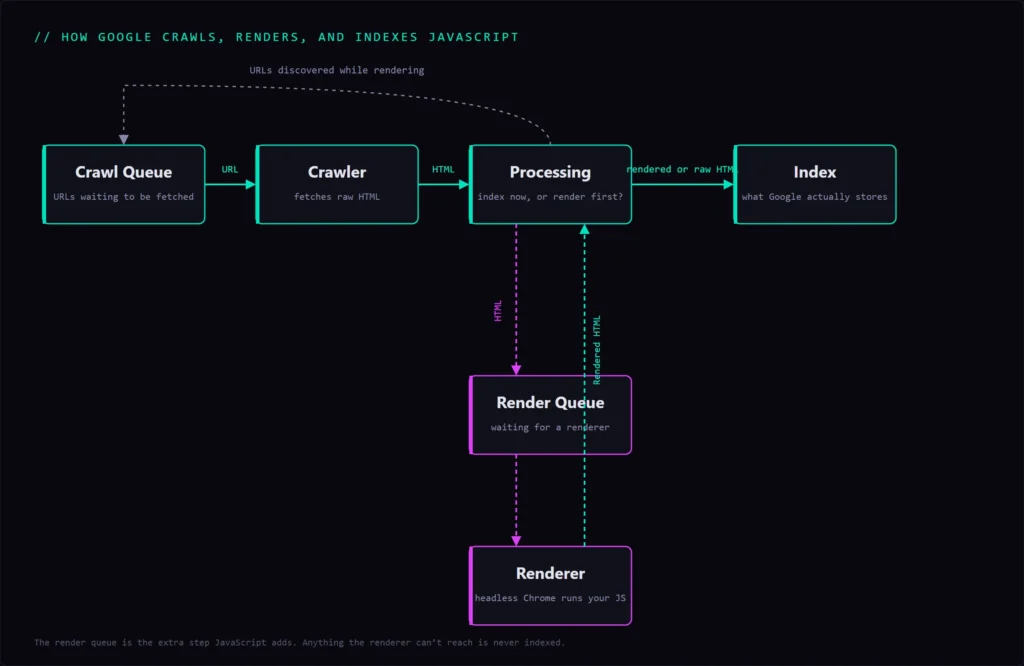
Google handles JavaScript in three separate phases: crawl, render, and then index. Googlebot first fetches your raw HTML. If that HTML depends on JavaScript to build the page, the URL is added to a render queue, where a headless version of Chrome eventually executes the JavaScript and produces the finished DOM. Only then does Google index what the page actually contains.
Static HTML collapses crawl and render into one step. JavaScript splits them apart, and everything your script builds is invisible to Google until that second step runs. That extra step is the entire source of risk. Google renders at scale, around 200 million pages a day, with a median render time of about 5 seconds, but anything the renderer cannot reach is never indexed.
Google can render JavaScript, so calibrate the panic
Here’s the part most coverage gets wrong: the problem is almost never that Google can’t render JavaScript. It can be done reliably and usually quickly. The problem is that your implementation hides content from the renderer. A large-scale analysis of more than 37,000 page pairs found that Google rendered close to 100% of them, with a quarter of them within 4 seconds, contradicting the “rendering queue takes days” mythology.
So when a JavaScript site disappears from search, don’t blame Google’s capability. Look at what your own pages are serving the crawler before the script runs.
The Empty Rendered Shell: How a Headless Rebuild Breaks SEO
This is the failure that cost The Tour Guy two years of growth before I arrived. It is worth understanding in detail, because it is invisible until you know exactly where to look.
What a headless build ships to Googlebot
A headless build can serve crawlers a near-empty HTML document while users see a full page. In a decoupled setup, the front end is separate from the CMS, and a client-side framework like React assembles the page in the browser after the initial HTML loads. That initial HTML is often just a navigation bar, a few meta tags, and a JavaScript bundle. The headline, the body copy, the internal links, the tour descriptions: none of it exists until the browser runs the script.
To a human, the page looks complete because a browser always runs JavaScript. To Googlebot reading that first HTML response, the page is an empty shell. The Tour Guy had migrated to exactly this setup before I joined: headless WordPress with a React front end, every page rendered client-side. Hundreds of tour and destination pages were effectively blank to search engines, which is why a site with strong content and a strong brand sat flat at 4,400 visits a month.
Why the damage is easy to miss
The reason this problem survives for years is simple: the site works for every human who checks it. Your designers, executives, and customers all open the page in a browser, the browser runs the JavaScript, and everything looks fine. The one visitor that matters for organic traffic, the crawler reading initial HTML, is the one nobody tests as. At The Tour Guy, the signal that something was wrong wasn’t on the page. It was in the data: a content-rich site that would not grow. That mismatch between obvious quality and flat traffic is what triggered the diagnosis.
CSR vs SSR vs SSG vs Dynamic Rendering
Where your HTML gets built determines what crawlers receive. There are four common strategies, and they are not equal for SEO.
The four rendering strategies, ranked for SEO
The safest strategies hand the crawler complete HTML; the riskiest make it do the work. Here is the plain-language version of each.
- Client-side rendering (CSR): the browser builds the page from a JavaScript bundle. The initial HTML is nearly empty. This is the failure mode, and the usual culprit behind lost rankings.
- Server-side rendering (SSR): the server runs JavaScript and returns complete HTML for every request. Crawlers get the full page immediately.
- Static site generation (SSG): pages are pre-built into complete HTML at build time and served as static files. Fastest and safest, best for content that doesn’t change per request.
- Dynamic rendering: the server detects bots and serves them a pre-rendered HTML snapshot while users get the client-side app.
| Strategy | Where HTML renders | What Googlebot gets | SEO risk | Best for |
|---|---|---|---|---|
| CSR | In the browser | Near-empty initial HTML | High | Interactive apps behind a login |
| SSR | On the server, per request | Complete HTML | Low | Content that needs SEO |
| SSG | At build time | Complete static HTML | Lowest | Content that rarely changes |
| Dynamic rendering | A separate bot path | Prerendered snapshot | Medium (legacy) | A temporary bridge only |
Why dynamic rendering is now a legacy patch
Dynamic rendering was the popular workaround, but Google now treats it as a stopgap. Its own documentation calls dynamic rendering a workaround rather than a long-term solution and recommends server-side rendering, static rendering, or hydration instead. (Google Search Central)
As someone who has gone through this, reach for it only as a temporary bridge while you build something durable. Serving one version to bots and another to users is fragile, adds a moving part that can break quietly, and sits uncomfortably close to cloaking. If you are choosing an architecture today, choose SSR or SSG and skip the patch.
How to Diagnose JavaScript SEO Problems
You do not need expensive tooling to confirm a rendering problem. You need to see your page the way a crawler does. These are the exact checks I ran on The Tour Guy.
Compare view-source against the rendered DOM
The fastest tell is a mismatch between your raw HTML and your rendered page. Right-click and choose “View Source” to see the HTML the server actually sends. Then right-click and choose “Inspect” to see the rendered DOM after JavaScript runs. Search both for a unique sentence in your body copy. If the sentence appears in Inspect but is missing from View Source, your content is rendering client-side, and any crawler that doesn’t execute your JavaScript will never see it. This single check surfaces most empty-shell problems in under a minute.
Use the GSC URL Inspection live test
Google Search Console shows you what Googlebot actually rendered. Run the URL Inspection tool on a live URL, choose “Test Live URL,” then open “View Crawled Page” and the rendered screenshot. If the rendered HTML is missing your body content, or the screenshot shows a blank or partial page, Google isn’t seeing what your visitors see. This was the confirmation step at The Tour Guy, and pairing it with a JavaScript-rendering crawl in Screaming Frog let me quantify how many pages were affected across the entire site rather than guessing from a handful. URL Inspection only checks one page at a time, though. The site-wide tell shows up under Page indexing: an empty shell gets fetched, gives Google nothing worth keeping, and lands in Crawled – currently not indexed alongside your feeds and pagination.
Check for blocked resources and soft 404s
Two quieter failures can break rendering even on a well-built site. First, confirm your JavaScript and CSS files are crawlable and not disallowed in robots.txt; if Googlebot cannot fetch the script, it cannot render the page. Second, verify that JavaScript-built “not found” states return a real 404 status code, not a 200. A single-page app that shows a “page not found” message while returning a 200 status code creates soft 404s that waste crawl budget and confuse indexing.
The Fix: Make Your JavaScript Site Renderable
Diagnosis is fast. The fix is an architecture decision, and there is a right direction.
Move rendering to the server, or pre-build it
The durable fix is to deliver complete HTML so your content exists before any JavaScript runs. That means server-side rendering or static generation instead of client-side rendering, so the crawler receives the full page in the initial response. At The Tour Guy, we verified the empty-shell problem, built a remediation plan, and added a prerendering layer that served crawlers a fully rendered HTML snapshot of each page instead of the blank scaffold.
In 2020, that was the pragmatic call: it put complete HTML in front of search engines fast, without rebuilding the React front end from scratch. Today, I’d reach for server-side rendering or static generation for the reasons above, but the principle is the same, and it’s not framework-specific: stop asking the crawler to build your page and instead hand it the finished page.
Verify, then measure the recovery
After the fix, rerun the same checks to confirm that crawlers now receive your content, then monitor indexation and organic traffic to confirm the real impact. Joining your GA4 and Search Console data makes that recovery straightforward to attribute.
The recovery at The Tour Guy wasn’t subtle. Organic traffic went from roughly 4,400 visits a month when I joined in early 2020 to about 175,000 a month by May 2023, a nearly 39x increase. The full Tour Guy case study breaks down the timeline and the numbers. In Ahrefs terms, the organic traffic value climbed from around $1,000 a month to roughly $72,000 a month. The fix unlocked content that had been ranking-ready the whole time; it was just invisible.
JavaScript SEO Is Now an AEO Problem Too
There is a newer reason to care about rendering, and almost no JavaScript SEO guide covers it: the AI engines your buyers now use to research are far worse at JavaScript than Google is.
Most AI crawlers cannot execute JavaScript
Even if Googlebot renders your JavaScript perfectly, most AI answer engines don’t render it at all, which means a client-side site is an empty shell to them, and you vanish from AI answers entirely. Among major AI crawlers, Applebot and Google’s Gemini render JavaScript, while OpenAI’s GPTBot, Anthropic’s ClaudeBot, and PerplexityBot fetch your files but do not execute them. You can check which AI crawlers actually reach your pages, and how fast they respond, before it costs you a citation.
If your content only exists after the browser runs a script, ChatGPT and Perplexity see the same blank scaffold that Googlebot saw at The Tour Guy. Structured data doesn’t save you here either, since most assistants strip JSON-LD on retrieval, so server-rendered HTML in the initial response is the only baseline that works across both search and AI.
Key insight
JavaScript SEO and answer engine optimization are now the same problem viewed from two angles, and server-rendered content is what satisfies both.
Conclusion
JavaScript SEO comes down to one question: does the crawler receive your content, or just the scaffolding around it? If the answer is “just the scaffolding,” the fix is mechanical, and the upside is everything that was already ranking-ready but hidden.
Next Steps
- Run the View Source versus rendered DOM check on your top pages today.
- Spot-check those URLs in the GSC URL Inspection live test.
- If your content is missing from the initial HTML, consider moving to SSR or SSG.
If your traffic is flat and you suspect rendering is the reason, that is exactly the kind of technical SEO problem I diagnose and fix.
JavaScript SEO Diagnosis Checklist
- Audit your top pages by comparing View Source against the rendered DOM for a unique sentence of body copy.
- Run each page through the GSC URL Inspection live test and open the rendered HTML and screenshot.
- Confirm your JavaScript and CSS files are crawlable and not blocked in robots.txt.
- Verify that JavaScript-built “not found” pages return real 404 status codes, not soft 404s.
- Identify your current rendering strategy: CSR, SSR, SSG, or dynamic rendering.
- If content renders client-side, move it server-side with SSR or pre-build it with SSG.
- Re-test rendering after the fix, then track indexation and organic traffic to confirm recovery.
- Spot-check AI visibility by confirming your critical content exists in the raw HTML, where non-rendering AI bots can read it.
Frequently Asked Questions
Is JavaScript bad for SEO?
No. JavaScript itself is fine, and Google renders it reliably. The risk is client-side rendering that leaves your content out of the initial HTML, so crawlers receive an empty shell. Deliver server-rendered or pre-built HTML and JavaScript causes no SEO problem.
How does Google render JavaScript?
In three phases. Googlebot crawls your raw HTML, queues the page for rendering, then runs the JavaScript in a headless version of Chrome to build the full DOM, and finally indexes that rendered result. Content that only appears after the script runs is indexed only once that render step completes.
CSR vs SSR, which is better for SEO?
Server-side rendering (SSR) is better for SEO. It sends complete HTML on every request, so crawlers and users get the full page immediately. Client-side rendering (CSR) defers everything to the browser and leaves the initial HTML nearly empty, which is the most common cause of JavaScript indexing problems.
How do I check what Googlebot actually sees on my page?
Compare “View Source” (the raw HTML the server sends) against “Inspect” (the rendered DOM), searching both for a sentence of your body copy. Then run the page through Google Search Console’s URL Inspection live test and open the rendered HTML and screenshot to see exactly what Googlebot rendered.
Can ChatGPT and other AI engines read JavaScript content?
Mostly no. Most AI crawlers, including OpenAI’s and Perplexity’s, do not execute JavaScript, so client-side content is invisible to them. If you want to appear in AI answers, your content must exist in the server-rendered HTML, not be built in the browser after the page loads.
How do I make a JavaScript site SEO-friendly?
Serve complete HTML to crawlers. Use server-side rendering or static generation so your content exists in the initial response, keep your JavaScript and CSS crawlable, return correct HTTP status codes, and verify the result with View Source and the GSC URL Inspection live test.
Sources
- https://ahrefs.com/blog/javascript-seo/
- https://vercel.com/blog/how-google-handles-javascript-throughout-the-indexing-process
- https://developers.google.com/search/docs/crawling-indexing/javascript/dynamic-rendering
- https://vercel.com/blog/the-rise-of-the-ai-crawler
- https://developers.google.com/search/docs/crawling-indexing/javascript/javascript-seo-basics