The script people are using to convert a website to markdown can’t read the blog post it came from.
I checked. Screaming Frog’s own article on generating markdown at scale has 25,150 characters of content and zero <article> elements, so the popular community script returns nothing on it. It’s the first thing I found when I started counting the output.
Here’s the setup. You want an entire site (yours, or a competitor’s) as markdown files you can hand to an LLM in one go. Screaming Frog can do it: its Custom JavaScript feature runs your code against every rendered page and drops the result into a column you can export. Two scripts circulate for this. They look nearly identical, but one line differs.
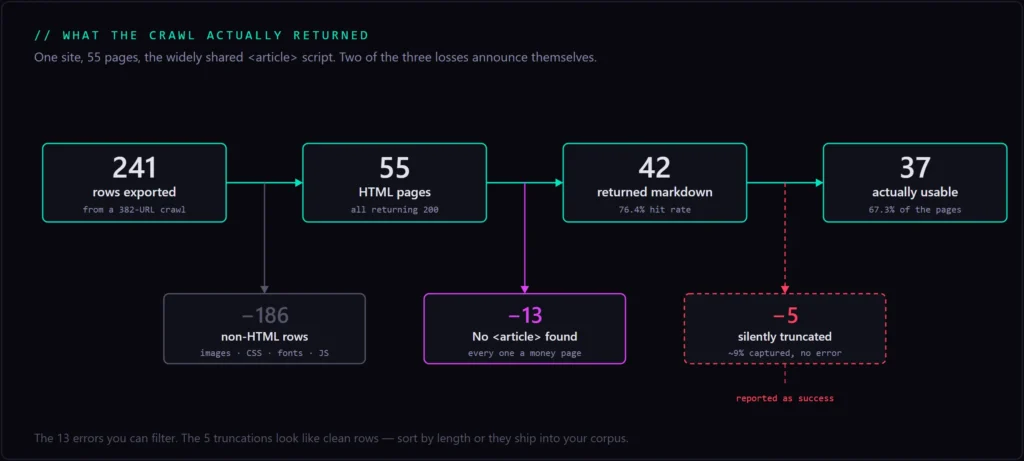
I ran both against the same 55 pages of my own site and counted what came back. One returned nothing on 13 of them. On five more it returned about 9% of the page and reported success.
This is the opposite of serving markdown out to agents, which I wrote about after building content negotiation on WordPress. There I was handing markdown to anything that asked. Here I’m pulling markdown out of sites that never offered it.
Key Takeaways
- Screaming Frog’s Custom JavaScript feature turns an entire crawl into markdown, but it needs a paid licence. Custom JavaScript and JavaScript rendering are both licence-only.
- Two scripts circulate. They differ by one line, and that line cost me 24% of my pages.
- The widely shared version returned
No <article> element foundon 13 of 55 pages. Every one was a template-driven page I sell from. - The worse failure is silent: on listing pages it captured 9.3% of the content and reported success on all of them.
- Screaming Frog’s official Readability-based script hit 100% on the same 55 pages and stripped roughly 11,700 tokens of repeated boilerplate.
- Both scripts still break YAML on wrapped headings and mangle snake_case identifiers. Two small functions fix it.
Why a markdown corpus beats copying pages one at a time
The point isn’t that markdown is smaller than HTML, though it is. The point is that you can hold a whole site in context at once.
Markdown strips the scripts, styles, and wrapper divs that make up most of a page’s weight while keeping the structure a model actually uses: headings, lists, tables, links. I measured the honest content-to-content saving when I built markdown negotiation for this site: 5,730 tokens down to 3,287, about 43%. Cloudflare quotes closer to 80%, but that counts the full page shell. Either way you’re buying room in the context window.
What that room buys you is the difference between asking a model about a page and asking it about a business. One page tells you how a competitor describes a service. Fifty pages tell you what they sell, who they sell it to, which claims they repeat, and where their positioning contradicts itself.
What a 55-page site costs you in context
My site is small. Here’s what it came out to:
| Characters | Approx. tokens | |
|---|---|---|
| Circulating script | 581,272 | ~145,300 |
| Screaming Frog’s official script | 622,563 | ~155,600 |
Mean page: about 13,800 characters. That gives you a rough multiplier for sizing your own crawl. A 200-page site lands somewhere near 550,000 tokens, which is more than most context windows hold in one pass and means you’ll be chunking or selecting rather than dumping.
How to convert a website to markdown in Screaming Frog
Four steps:
- Open Screaming Frog.
- Configuration > Spider > Rendering and switch rendering to JavaScript.
- Configuration > Custom > Custom JavaScript.
- Click Add, paste your snippet, and crawl. Results land in the Custom JavaScript tab in the right-hand pane.
That’s the whole configuration.
The two gates
You need a paid licence. The free version caps at 500 URLs, and more relevant here, Custom JavaScript, Custom Extraction, and JavaScript rendering are all marked with a cross in the free column of Screaming Frog’s pricing table. A licence is $279 per year for one to four seats, dropping to $235 at twenty or more. There’s no free path to this workflow. Screaming Frog is absolutely worth it though. It’s one of my main tools that I use on every client site.
JavaScript rendering is mandatory, and it changes the crawl. Custom JavaScript only runs in rendered mode, so every URL goes through the embedded Chromium instead of a plain text fetch. That’s slower and heavier than a normal crawl. It also means what your script sees is the rendered DOM, not the raw HTML. That’s the same distinction that decides whether a JavaScript site ships an empty shell to Google. For this workflow the rendered DOM is what you want, since it’s the version with the content in it.
One more thing worth knowing before you run a big crawl: both scripts load their libraries from unpkg at crawl time, on every URL. That’s an external dependency inside your crawl. If unpkg is slow or blocked on your network, extraction fails rather than degrades.
Two scripts are circulating, and they differ by one line
The one you’ll find first is scrape-to-markdown-on-steroids.js in e-orlov’s Screaming Frog snippet collection. It’s the one that gets passed around on LinkedIn. Its own header credits its source: Screaming Frog’s post on generating markdown at scale.
Both use Turndown to do the HTML-to-markdown conversion, with identical configuration: ATX headings, fenced code blocks, hyphen bullets. Both add the same rule to drop images without alt text, and the same rule to drop empty links. Both collapse runs of blank lines. The frontmatter fields differ slightly.
The difference that matters is which part of the page they hand to Turndown.
The line that matters
// The circulating version
const articleEl = document.querySelector('article');

// Screaming Frog's official version
const article = new Readability(documentClone).parse();
Readability is the engine behind Firefox’s Reader View. It works out where the main content is by scoring elements on text density, link ratio, and class names, which means it works on markup it has never seen before.
document.querySelector('article') asks the site to have used one specific tag. And to have used it exactly once.
Neither of those is safe to assume on a site you don’t control, which, if you’re pointing this at competitors, is the entire use case.
What the circulating script actually returned on 55 pages
76.4% hit rate. Thirteen of 55 pages came back with the string No <article> element found. Here’s the shape of the crawl:
Every page it failed on was a page I sell from
The thirteen failures weren’t a random scatter. They were all six service pages, plus /contact/, /tools/, /method/, /mcp/, /okf/, and a case study.
Every blog post extracted cleanly. Every commercial page failed.
The reason is structural. On this site the posts render through a template that wraps them in <article>, while the service and tool pages are built from custom templates where the copy lives in PHP rather than the post body. That’s a common pattern, and not just on WordPress. Landing pages, product pages, and pricing pages are the ones most likely to be hand-built outside the blog template. If you’ve never audited how your own templates differ, a crawl like this is a blunt way to find out.
Which is the problem, because those are the pages you actually want from a competitor. Nobody crawls a rival’s site to read their blog. You want the services, the positioning, the pricing, the proof. Those are the pages most likely to come back empty.
The failure you don’t notice
The 13 errors are the good outcome. You can see them, filter them, and go fix your selector.
querySelector returns the first match. Not all of them. On any listing page where each card is its own <article> (a blog index, a case study grid, a résumé built from repeated entries), the row comes back populated. It’s just almost empty, and nothing tells you.
| Page | <article> elements | Captured | Of what was there |
|---|---|---|---|
/learn/ | 25 | 357 chars | 4.1% |
| Homepage | 3 | 358 chars | 7.7% |
/entitymap/ | 15 | 934 chars | 9.2% |
/resume/ | 5 | 564 chars | 11.2% |
/case-studies/ | 4 | 972 chars | 17.7% |
Across those five pages: 9.3% of the content, and five reported successes.
My résumé came back as one job. My blog index came back as one post card out of 25. If I had not sorted the column by length, I would’ve shipped all five into the corpus and then wondered why the model kept saying I had held one role.
Key insight
Search Engine Land’s SEO library has 91 <article> elements. The script returns 327 characters out of 14,803 characters of rendered content, and what it hands back is an <img> tag, because that’s how the first card starts. Roughly 2% capture, logged as a success.
Why Screaming Frog’s official script wins
Same 55 pages. Same Turndown settings. 100% hit rate.
It recovered all thirteen failures: 57,288 characters, about 14,300 tokens, including every service page and 14,908 characters from a single page the other script returned nothing for.
Then it does something less obvious. It returns less text on the pages where both scripts worked, and that’s an improvement.
On all 37 single-<article> pages, the circulating script returned more characters than Readability did. The extra isn’t content. My theme’s <article> wraps the closing call-to-action box and the author bio, so the <article> grab drags both into every post. Readability scores them as chrome and strips them. Across those 37 pages that’s 46,905 characters, roughly 11,700 tokens of the same two paragraphs repeated.
| Circulating script | Official script | |
|---|---|---|
| Pages returning nothing | 13 / 55 | 0 / 55 |
| Total characters | 581,272 | 622,563 |
| Approx. tokens | ~145,300 | ~155,600 |
7.1% more content, while removing 11,700 tokens of boilerplate. More signal and less noise at the same time.
It’s also why the official version can read Screaming Frog’s own post about markdown and the circulating one can’t. No <article> element on that page. Readability doesn’t need one.
What both scripts still get wrong
Start with what works, because plenty does. Across 42 successful extractions I found zero base64 data URIs, zero raw SVG dumped into the text, zero HTML tables left unconverted, and no navigation bleed. Fenced code blocks survived intact on all 13 pages that had them. The image and empty-link rules do exactly what they claim.
Two defects survive in both scripts, and I only found them by reading the output rather than the row counts.
Wrapped headings break the YAML
Both scripts escape double quotes in the frontmatter and nothing else:
'title: "' + title.replace(/"/g, '\\"') + '"'My homepage H1 wraps across two lines in the source. So the output was this:
h1: "Todd M. O'Rourke
			SEO Consultant. AI Innovator.Builder of things that rank."
That’s a literal newline inside a double-quoted YAML scalar, which fails every parser that touches it. One file in 42 here, but it will hit any site with a heading long enough to wrap.
The circulating script is more exposed because it pulls the raw H1. The official one uses Readability’s metadata, which rarely wraps, so the bug is latent rather than active. The escaping code is equally naive in both.
Turndown mangles your identifiers
Nine of 42 pages came back with corrupted code tokens:
template\_redirect
robots\_txt
turn\_use\_case
e\_001
Turndown escapes underscores because in markdown an underscore can mean emphasis. In prose that’s correct. In technical content it quietly rewrites your function names, hooks, and variables. This is the one defect that actively corrupts the thing you’re feeding the model.
Both fixes are small. Here’s the whole script I use now. It’s Screaming Frog’s official version with the two patches added, plus a source field so every file knows which URL it came from. Paste it straight into Configuration > Custom > Custom JavaScript:
// Markdown extraction for Screaming Frog Custom JavaScript — hardened build.
//
// Based on Screaming Frog's official Method 1:
// https://www.screamingfrog.co.uk/blog/generate-markdown-at-scale/
//
// Two changes on top of the original:
// FIX 1 - newline-safe YAML escaping. The original escapes " but not \n, so a
// wrapped heading emits a literal newline inside a quoted scalar and
// breaks every YAML parser downstream.
// FIX 2 - stop Turndown escaping underscores inside identifiers. The original
// returns template\_redirect, robots\_txt, turn\_use\_case.
// Plus: a source: field in the frontmatter.
function loadScripts() {
return new Promise((resolve, reject) => {
const readability = document.createElement('script');
readability.src = 'https://unpkg.com/@mozilla/readability/Readability.js';
readability.onload = () => {
const turndown = document.createElement('script');
turndown.src = 'https://unpkg.com/turndown/dist/turndown.js';
turndown.onload = () => resolve();
turndown.onerror = () => reject(new Error('Failed to load Turndown.js'));
document.head.appendChild(turndown);
};
readability.onerror = () => reject(new Error('Failed to load Readability.js'));
document.head.appendChild(readability);
});
}
// FIX 1: collapse all whitespace (including newlines and tabs) to single spaces
// before escaping quotes, so the value is always a valid one-line YAML scalar.
function yamlScalar(value) {
return String(value).replace(/\s+/g, ' ').replace(/"/g, '\\"').trim();
}
function extractMarkdown() {
const documentClone = document.cloneNode(true);
const article = new Readability(documentClone).parse();
if (!article || !article.content) {
return 'Readability could not extract content from this page';
}
const turndownService = new TurndownService({
headingStyle: 'atx',
codeBlockStyle: 'fenced',
bulletListMarker: '-'
});
// FIX 2: un-escape underscores that sit between alphanumerics, so snake_case
// identifiers survive. Standalone emphasis markers stay escaped. The lookahead
// handles consecutive underscores (turn_use_case, not turn_use\_case).
const defaultEscape = TurndownService.prototype.escape;
turndownService.escape = function (string) {
return defaultEscape.call(this, string)
.replace(/([A-Za-z0-9])\\_(?=[A-Za-z0-9])/g, '$1_');
};
turndownService.addRule('cleanImages', {
filter: 'img',
replacement: function(content, node) {
const alt = node.getAttribute('alt') || '';
const src = node.getAttribute('src') || '';
if (!alt.trim()) return '';
return '';
}
});
turndownService.addRule('removeEmptyLinks', {
filter: function(node) {
return node.nodeName === 'A' && !node.textContent.trim();
},
replacement: function() { return ''; }
});
const markdown = turndownService.turndown(article.content);
const frontmatter = [
'---',
article.title ? 'title: "' + yamlScalar(article.title) + '"' : null,
article.byline ? 'author: "' + yamlScalar(article.byline) + '"' : null,
article.siteName ? 'site: "' + yamlScalar(article.siteName) + '"' : null,
article.excerpt ? 'excerpt: "' + yamlScalar(article.excerpt) + '"' : null,
'source: "' + window.location.href + '"',
'---'
].filter(Boolean).join('\n');
return frontmatter + '\n\n' + markdown.replace(/\n{3,}/g, '\n\n').trim();
}
return loadScripts()
.then(() => seoSpider.data(extractMarkdown()))
.catch(error => seoSpider.error(error));I tested this build across 12 of the pages that broke under the other script. Frontmatter came back well-formed on all of them, including the homepage that had been emitting a raw newline into YAML. Zero mangled identifiers. Prose brackets stayed correctly escaped, which is what you want, because the fix targets identifiers, not all escaping.
Bulk export, and the 77% you throw away
Once the crawl finishes, export the Custom JavaScript tab. You get one row per URL with the markdown alongside it.
Then you hit the part nobody warns you about. My export had 241 rows. Only 55 were HTML pages. The other 186 were images, stylesheets, fonts, and scripts: 92 WebP files, 14 CSS files, 13 JavaScript files, six web fonts, and assorted JSON and text. Every one an empty cell.
77% of the export was filler.
This is the same shape as a Search Console export, where most of the “crawled – currently not indexed” report is noise Google is right to skip. The fix is the same too: triage before you act. Either exclude non-HTML in the crawl configuration up front, or filter on content type after. Doing it up front also makes the crawl faster, since you aren’t rendering images.
Screaming Frog’s post ships a small Python script that reads the exported .xlsx and writes one .md file per URL, naming files from the URL path. It’s worth using rather than rewriting, because it handles the naming collisions you’d otherwise hit.
One habit worth building: before you trust any of it, sort the markdown column by length and look at the shortest rows. That single step would’ve caught every silent truncation in my crawl.
Feeding the corpus to a model
For my own site, the destination is the raw folder of the second brain I built. That system already ingests audits, GSC exports, and competitor breakdowns. It just never had a good way to swallow an entire website. This is the missing step in front of it.
For a competitor’s site, the workflow changes shape. Reading a rival page by page, the way I described when writing about outranking a competitor, gets you a page at a time and your own recency bias. Handing a model 40 of their pages at once gets you the things that only show up in aggregate: which claims they repeat on every page, which audience they actually write for versus the one they say they target, where the services pages promise something the case studies never demonstrate.
That’s also the antidote to the failure mode I wrote about in an AI content strategy that doesn’t sound like AI : generating ideas against the void. A real corpus of what competitors have actually published is the opposite of a void, and it’s the difference between “write me twenty blog topics about X” and “here’s everything these four companies have said about X, find what none of them covers.”
Three practical notes:
- Strip the boilerplate before ingest, not after. The official script handles most of it; check what survives on your templates.
- Keep the source URL in every file. The patched script writes it into the frontmatter. Without it, a model citing something back to you is unverifiable.
- Expect to be blocked. Competitor sites sit behind WAFs, and a crawler identifying as Screaming Frog gets treated differently than a browser. If pages come back 403 rather than empty, that’s an access problem, not a script problem. You can check which crawlers a domain actually lets through before blaming your configuration.
This kind of aggregate reading is most of what competitive intelligence work looks like now, and the collection step is the part that used to be tedious enough that people skipped it.
Conclusion
Use Screaming Frog’s official Readability-based script, not the one circulating on GitHub. On identical input it went from 76.4% to 100% coverage, recovered every page the other one dropped, and removed 11,700 tokens of repeated boilerplate along the way.
Then patch the two things it still gets wrong: escape your YAML for newlines, and stop Turndown from rewriting your identifiers.
And whichever script you use, check your hit rate before you trust the corpus. The 13 hard failures announced themselves. The five silent ones didn’t, and those are the ones that end up quietly wrong inside whatever you build next. Sort by length. Read the short rows. It takes a minute and it’s the only step here that catches the failure you can’t see.
Next Steps
Run it on your own site first, where you know what the pages say and can tell immediately when the output is wrong. Then point it at a competitor.
Website to Markdown Checklist
- Confirm you’ve a paid Screaming Frog licence. Custom JavaScript isn’t in the free version.
- Go to Configuration > Spider > Rendering and set rendering to JavaScript.
- Go to Configuration > Custom > Custom JavaScript and click Add.
- Paste the Readability-based script, not the
querySelector('article')one. - Apply both patches: newline-safe YAML escaping, and the Turndown underscore fix.
- Exclude non-HTML content types in the crawl configuration so your export isn’t 77% empty rows.
- Run the crawl.
- Open the Custom JavaScript tab and sort by content length.
- Read the shortest rows first, because that’s where silent truncation hides.
- Export the tab to
.xlsx. - Split it into one
.mdfile per URL, keeping the source URL inside each file. - Load the corpus into your model and spot-check three pages against the live site before trusting any of it.
Frequently Asked Questions
Do you need a paid Screaming Frog licence to convert a website to markdown?
Yes. Custom JavaScript, Custom Extraction, and JavaScript rendering are all licence-only. They show as crosses in the free column of Screaming Frog’s own pricing comparison. The free version is also capped at 500 URLs. A licence is $279 per year for one to four seats.
Do you have to turn on JavaScript rendering?
Yes, Custom JavaScript only runs in rendered mode. That means every URL goes through the embedded Chromium browser rather than a plain fetch, so the crawl is slower and heavier than a text crawl. It also means your script sees the rendered DOM rather than the raw HTML, which for this workflow is what you want.
Why does my export say “No <article> element found”?
Because the page has no <article> element, and the script you’re using requires one. It happened on 13 of my 55 pages, all of them template-driven pages rather than blog posts. Switching to the Readability-based script fixed all 13 without any other change.
Why are most rows in my Custom JavaScript export empty?
They’re almost certainly not pages. In my export, 186 of 241 rows were images, CSS, fonts, and JavaScript files. Exclude non-HTML content types in the crawl configuration, or filter the export by content type before you do anything else with it.
Can I run this on a competitor’s site?
Yes, and it’s the stronger use case. You learn more from 40 of their pages at once than from reading ten of them carefully. Respect robots.txt and keep your crawl rate reasonable. Expect some sites to block you at the WAF, and expect their most valuable pages to be the ones most likely to fail extraction, since services and pricing pages are usually built outside the blog template.
Is there a better alternative to Screaming Frog for this?
Other tools do convert pages to markdown, and if you only need a handful of URLs a crawler is overkill. This article is specifically about doing it at crawl scale, where Screaming Frog’s Custom JavaScript is the route I use.